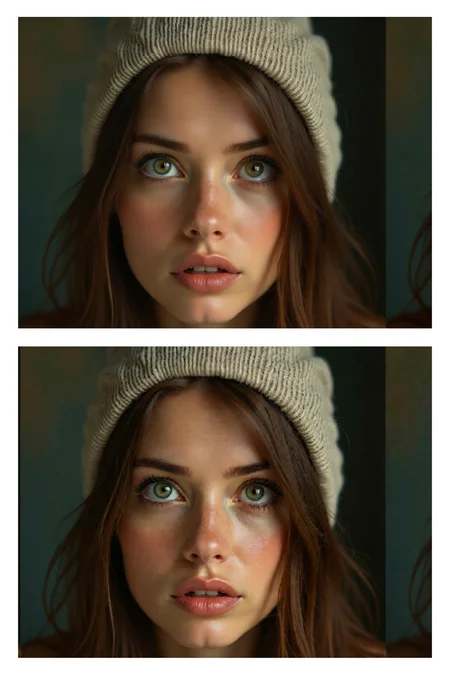
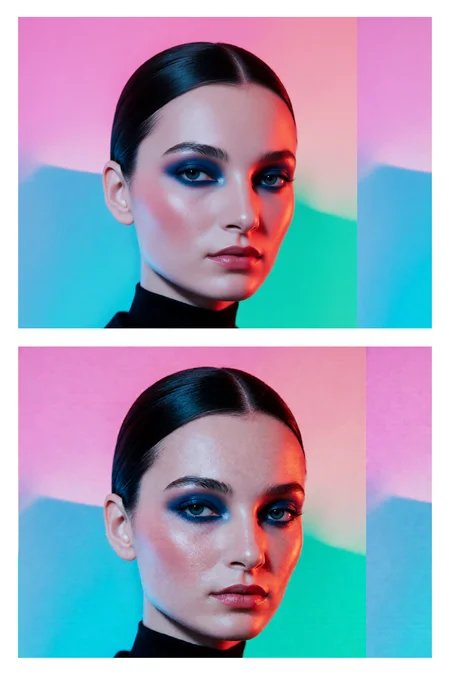
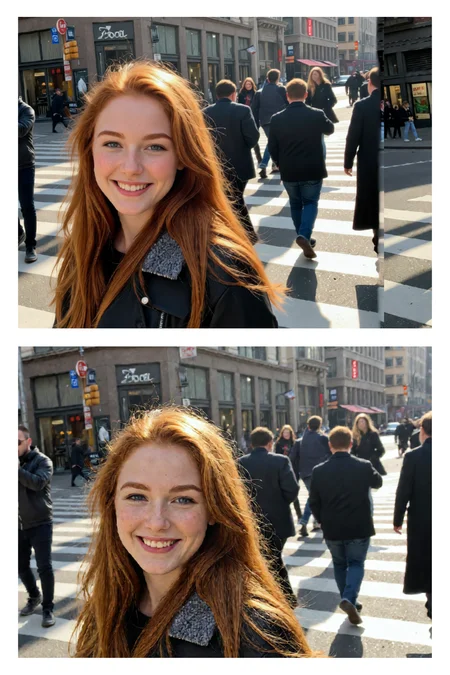
Finetuned LoRA for Enhanced Skin Realism in Qwen-Image-Edit-2509
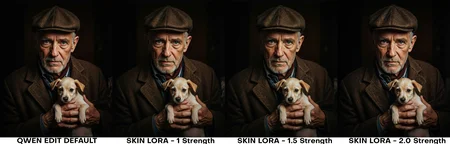
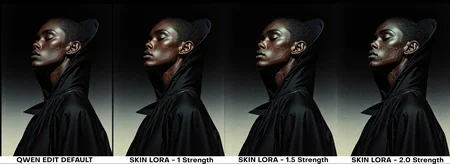
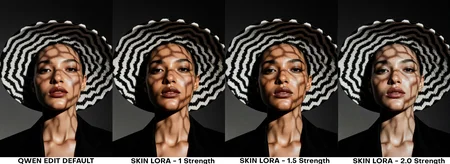
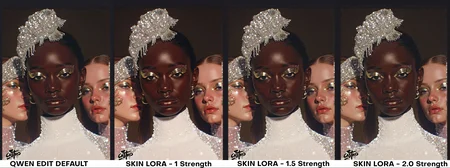
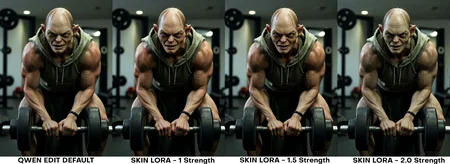
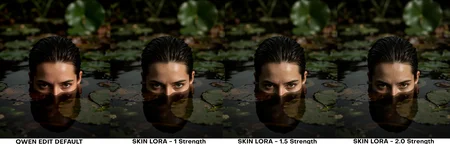
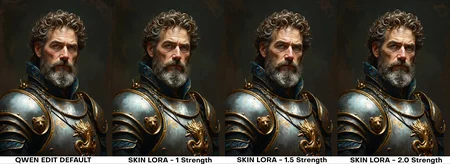
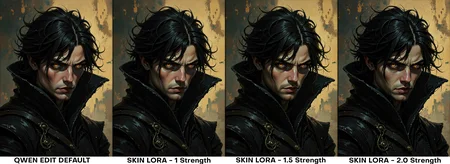
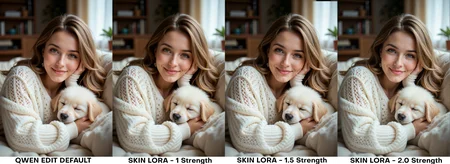
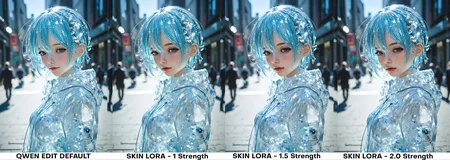
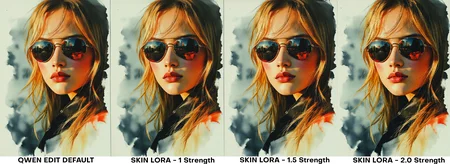
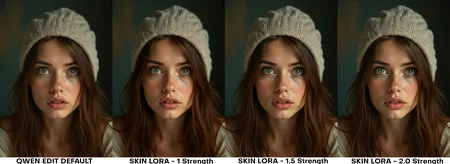
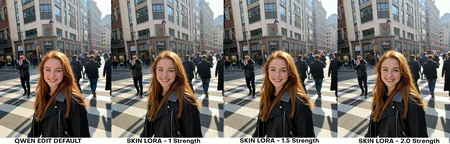
Note: Check the version differences. In Version 1.1 as an example, I've also uploaded previous steps of this version training, so you can download from steps 1750 all the way to 2750 to suit your needs. I attached full comparison images across each LORA and each step count for you to see the sweet spot for your workflows.
You can also download the comparision workflow I made here:
https://civarchive.com/models/2100345/lora-xyz-compare-workflow
This repository contains a finetuned Low-Rank Adaptation (LoRA) model designed to enhance the realism and detail of human skin in images. The LoRA has been trained on top of the powerful Qwen/Qwen-Image-Edit-2509 model, leveraging its advanced image editing capabilities to focus specifically on generating more natural and detailed skin textures.
This model was trained for 5000 steps on a local RTX 5090 using the AI-Toolkit. The resulting LoRA is ideal for photographers, digital artists, and anyone looking to improve the quality of human subjects in their generated or edited images.
Model Description
The qwen-edit-skin LoRA is a specialized finetuning of the Qwen/Qwen-Image-Edit-2509 base model. The base model is a versatile image editor with strong capabilities in multi-image editing and maintaining single-image consistency, particularly in preserving personal identity. This LoRA builds upon that foundation to specifically address the nuances of human skin, adding detail and realism that may not be present in the original generations.
The training was conducted using this fork of AI ToolKit, a comprehensive suite for finetuning diffusion models. The process for curating the dataset involved reverse modification of subject skin details as follows:
Taking real images of versatile subject portraits with skin exposed
Captioning each of these as our “Target” (THE AFTER) images for the final outcome expected in a standard Qwen Edit workflow
Editing the image in Photoshop to add more gaussian blur and smoother skin tones, to make the skin texture, tone and pores less visible
These became our “Control” (The BEFORE) images for Qwen Edit training.
Training Details
The model was finetuned with the following key parameters, which can be found in the accompanying config.yaml file:
Hardware:
GPU: NVIDIA RTX 5090
Training Configuration:
Training Steps: 5000
Batch Size: 1
Gradient Accumulation: 1
Learning Rate: 1.0e-04
Optimizer: adamw8bit
Noise Scheduler: flowmatch
Resolution: The model was trained on a dataset with resolutions of 512, 768, and 1024 pixels.
Precision: bf16
Network Architecture:
Type: LoRA
Linear Rank & Alpha: 16
Convolutional Rank & Alpha: 16
The choice of adamw8bit as the optimizer is significant as it reduces the memory footprint of the training process, allowing for more efficient finetuning on consumer-grade hardware without sacrificing performance. The flowmatch noise scheduler is a modern approach that can lead to more efficient training and high-quality image generation.
A notable aspect of the LoRA architecture is that the alpha values for both linear and convolutional layers are set to be equal to their respective rank (16). This balanced approach is a common starting point for LoRA training, ensuring that the learned adaptations are applied with a proportional scaling factor, which can help in preventing overfitting while allowing the model to learn the desired new features effectively.
How to Use
To use this LoRA, you will need to load the base model Qwen/Qwen-Image-Edit-2509 and then apply the finetuned LoRA weights loaded as qwen-edit-skin.safetensors. Previous step versions of the weights are uploaded for reference but the final version is qwen-edit-skin.safetensors. You can also leverage the example workflow attached in the repo for ComfyUI to compare the results across different weights.
The recommended weight is between 1 and 1.5, the examples provided show weights up to 2 only to show the effect of the Lora with a strength considered too high for effect.
Intended Use
This LoRA is intended for creative and artistic purposes to enhance the realism of human skin in digital images. It can be used by:
Digital Artists: To add finer details and textures to the skin of their characters.
Photographers: For retouching and enhancing portraits.
AI Art Enthusiasts: To generate more lifelike images of people.
Limitations and Bias
This model is a finetuning of a large-scale, pre-trained model and may carry some of its inherent biases. The training dataset for this LoRA was focused on improving skin details and may not represent the full diversity of human skin tones and types equally. Users should be aware of this and use the model responsibly. The output of the model is influenced by the input prompt, and users are encouraged to use descriptive and inclusive language to guide the generation process.
Disclaimer: This model is intended for artistic and creative purposes. Users are responsible for the content they create and should adhere to ethical guidelines and respect the privacy and dignity of individuals.
Trigger words
You should use make the subjects skin details more prominent and natural to trigger the image generation.
Description
FAQ
Comments (19)
Love the amount of effort put into your description. Followed!
Thank you for the follow and comment! I wrote a little extra info here too if it's useful too
https://www.linkedin.com/pulse/uncanny-valley-ai-generated-skin-training-approach-realism-lennon-nuxre/
ty for the kind tip btw :)
This should be the top ranked resource on the site right now. It's an incredible improvement over typical cartoonish results with Qwen-Edit 2509. It improves skin, but also other textures in general. Brilliant! One downside so far is that it sometimes sees shaded areas as hair and adds it. Alas.
Wow thank you for the nice comment. I'll try improve it further to avoid changes in the hair
@TL_ No thank YOU for the great Lora!
I should also add a note it works more reliably if I keep the strength low. Strength 1.25-1.5 generates a completely new image unrelated to the input. My results with the Lora at 0.6-1.1 have been working really well though! (if curious: I'm using Qwen-Edit-2509_Q5_K_M, with Light-8Step BF16 lora, Shift 3, Steps 8, CFG 1, Euler, simple). If you have recommended model/lora versions to use, I can try that too. Keep up the awesome work!
Mother of all that is Holy, this is the absolute GOAT when it comes to 2509 skin textures (which is no easy feat because loras for 2509 that work well for removing plasticy-ness are rare).
What scheduler/sampler combinations are people using? As was mentioned, at str 1.5 gives the most real results (2.0 there was too much noise), even using euler/simple. What I did notice is that if you up it higher than 1.0, it changes the faces of the characters greatly, which is a shame. So I think that using it at 1.0 with the right scheduler/sampler will hit the jackpot.
I will also mention that I am using Lightning 2.0 8-step with this, which I have no doubt is adding to the noise at str 1.5+
I wouldn't usually recommend over 1.5 strength, those sample images showed up to a 2.0 strength to see how it can over impact the skin and cause extra issues.
On a side note, I also have a new version in progress that is being trained that hopefully will improve it further
@TL_ I can't wait to try it, happy to put it through its paces. And as @Boobooberry mentioned in his comments, I am testing same as he did with 0.6 - 1.0 to find the sweet spot. I am also going to test different scheduled/sampler combos to see what nets the best result once I get the strength right with euler/simple. I'll report back here for the masses.
@TL_ I have an issue I am seeing. If I use this at any strength (tested from 0.6-1.0), I don't get results even close to my reference character images I am feeding in. I get CONSISTENT results, but it is not at all close to my reference face images. I will continue to test with multiple generations to see if I am just unlucky with seeds, will look forward to your next iteration as well to test with. The skin quality, though, is amazing and if I just can't get the faces I need, I will inpaint them, but hoping not to have to do that.
@MysticalOne can you share your workflow? in both version 1 and 1.1 the facial consistency isn't an issue in my examples, can you try the workflows I've shared in the repo or in my new workflow post as an example?
Version 1.1 uploaded now too with better convergence, less artifacts etc.
@TL_ Let me do some more testing with your new 1.1 in my workflow and try and get it working with yours (I see your workflow is nunchaku, I don't use that. The issue might be with the quantized workflow I am using, I will try it with my current workflow, the defauly 2509 (non quantized) with and without lightning lora. I know lightning has caused issues with quality/consistency, my guess is it is my workflow. Allow me a few hrs to test with 1.1 in all my iterations and I will report back.
Also you mentioned "workflow you shared in the repo", where do I find that? I downloaded one of your images and imported that into Comfy, is that accurate?
Also, for the reference image with the 3 women in it, did you T2I all of them together (without inputting reference images) or use 3 different face close ups and then add them together with Qwen? The issue I seem to have (with more than just this) is having 2 different reference close ups of 2 different people then asking Qwen to put them together in the same scene and maintain the consistency of BOTH their faces. Qwen seems to want to either do none or just 1 that's close.
@MysticalOne some examples in my repo here to make it clearer https://huggingface.co/tlennon-ie/qwen-edit-skin
I input images of the subjects one at a time and then the LORA enhances the skin on any subjects. I don't think the issue you are facing is caused by the lora but maybe by whatever workflow you have active or the sampling settings/model quant etc.
@TL_ I see now where the disconnect is. In your examples in your repo, you are taking an existing image, feeding it into Qwen then just modifying it with your prompt to update the skin details. What I am trying to do is take 2 reference images (2 close ups of 2 different people's heads), use Qwen Image Edit to add them both to a scene together and apply your skin textures to them. I need to do more testing to see if it is Qwen itself that is being an ass and not keeping the character consistency in the faces, or if adding your lora is causing the issue. Need to do more testing with a few workflows I use.
@MysticalOne I just tested a flow using two separate subject inputs and adding my lora and it still works. Any issues with consistency will be the qwen model capability with your prompting, my lora still tweaks the existing sampling but the main structure is still determined by base model and prompting.
Maybe try something like:
"put the two subjects from image 1 and image 2 together standing , make the subjects skin details more prominent and natural"
Two new images being added to the gallery below this model once Civitai finishes it's processing
@MysticalOne Have you tried a multi-step workflow? Merge your characters first, then apply this Lora to that output image? Trying to do too many different things in a single step (especially mixing Loras, as I'm sure you know) isn't ideal since a Lora can't be trained on all possible workflow scenarios.
@Boobooberry I have not tried that but that seems like what I need to get past my issues. DO you have a good workflow I can test with or point me in the direction of a good one?
I have finished my testing. My setup:
- Qwen Image Edit 2509 with Lightning 8 step lora (using 10 steps). Using this lora at full 1.0 strength and no other loras for a clean baseline.
I tested the following scheduler/sampler combos
- euler/simple
- euler/beta
- euler_ancestral/sgm_uniform
- er_sde/beta
- er_sde/beta57
- lcim/ddim_uniform
- res2s/simple
- res2s/karras
- dpmpp_2m/karras
- dpm_sde/karras
- res2s/bong_tangent
The top 3 to use are:
- euler/beta (smoother skin textures, but detailed)
- res2s/bong_tangent (most detailed)
- res2s/simple (a blend of the 2 above, more refinement, but still good)