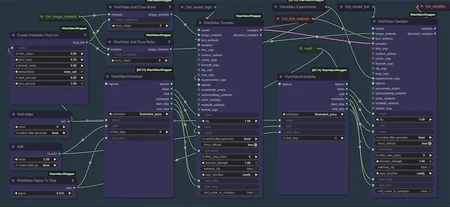
v1.5 - Lora update - New Wan 2.2 Lightx2v Moe.
v1.4 - Lynx GGUF option & minor edits.
v1.3 - Added Lynx face consistency model.
v1.2 - Color Match bypass fix and minor edits. Added new Wan 2.2 Reward loras to experiment with. Helps with overall quality, motion, color but can have weird outputs with it also.
v1.1 - Added Color Match to experiment with.
This is a modified version of this workflow.
Using the lynx face consistency model, pusa, lightxv2-MOE for wan 2.2/lightning loras its twice faster than example WanVideoWrapper workflow. Great face consistency with various NSFW loras loaded.
Downside is it is using more vram than the example WanVideoWrapper workflow, I'm not sure why but Pusa scheduler must be the reason, then again double inference speed must also be from it.
Its a looping workflow; by default you can create up to 5 videos with the nodes already present. 2x upscale & interpolation at the end.
Description
FAQ
Comments (26)
How do you disable upscale without error dropping. Every time I bypass the upscale group I get an error and generation stops. The error rreads “ No Input found for flattTeneD id 307 Slot 0
I'm not experienced with group bypassing. But if you bypass or delete everything to the right of Full Preview group, and enable save output in full preview node, it should work.
Or if you meant only the upscale group then you should move the "Get_value2ends" node out of it before bypassing the group since interpolate would use that node if upscaled image isn't available.
Yeah "Get_value2ends" shoulda been in Context Magic group now that I'm starting to understand bypassing :p
i dont have any problem with bypassing it. which node is the 307? For me, the problem was in the default setting of 2xRSGAN. i dont have it, i have only RSGAN 4x but i dont need either of them. Bypassed all the nodes in the Upscale group and it works fine.
I also deactivated the vae tiling and the low mem load for the loras. but i am using a 5090. I also dont like tea chace, so its also bypassed. It is also worth it to test other step combinations.
I am still playing arund with the workflow but its still not that easy to get a consistent video at the end from 5 different prompts. I am still at testing how i can get the best results.
But its a great workflow.
@lechuck777 yeah you have to be a bit lucky to get good end frames for the next parts of the video. I think low mem load doesn't work without the merge loras anyway, which doesn't work with the select loras node so it doesn't matter if its on or off. I don't think there is tea cache in this workflow tho(is there?).
@dozaler ah sorry, i meant interpolation, not tea cache. I am using it only if i already have the "perfect" config for what i want. That is rare lol.
becauce the loras. yah, i had both off. the merge and the low mem. youre right with it, that the merge didnt work with the model. but idk if the low mem does something or not.
i am still testing some values and which outcome they create. Your lora management is great for each loop. The prompting is a little bit tricky, but it depends on your scene and what do you want to do.
Also the seed has a big impact. Most of the time you need a good seed for your scene. My impression was, thats the thing which decides, if it works or not. Tested it so many times on standard wan workflows. Same prompt, same everything, and if you get the correct seed, then it does magically exactly what you described. Thats more like gambling around. lol
I'm trying this workflow now, but I notice it is doing 30 steps at some point. With the lightx2v lora's shouldn't that be very low like 4 or 6? Can you explain more about your setup?
after looking at the screenshot of your model, it seems like it should be 6. not sure if I disconnected it from the steps by accident or that you uploaded a version where the steps is not connected to the scheduler...
start step of the second sampler was also not connected to the sigma to step node ... I did get some errors while loading it, maybe that caused it, but you could check if they are really connected in your original uploaded version?
Never had that problem, it should be 6. Sigma output from the scheduler is not connected because it wasn't connected in the example workflow I took the Pusa setup from, idk why. Or if connecting it affects things or not.
works for me fine. i had only an error with the upscaler rsgan2x because i dont had it. And as always, i had to fix the path to my resources because the directorys of my, are named differend. But that is always an issue if you get some workflows from somwhere. Need to adjust it for your environment.
and i had to update kijas wan wrapper. The Pusa nodes was missing until i updated it and i had to download the two pusa loras from huggingface.
Followed! Great workflow improvements! Im experiencing color saturation issues, are you planning to keep improving it like with color matching? Ty so much
Funny you asked that, I've been trying color matching but the results are either "ok" or way too bright or way too dark if camera zooms out etc very unreliable.
@dozaler ty for your reply, Ive had success with "color match" node from kj
ive tried to learn from this wf and now wondering how to implement into "your" optimized wf, since the wf below changes the face a lot
https://civitai.com/models/1823416/wan-22-image-to-video-with-caption-and-postprocessing
(multi clip)
@juliusmartin5475844 Tried to replicate Color Match from that spaghetti workflow but its still not there yet I think. Added for experimentation.
great update, will test a lot
for everyone else having issues:
1)when downloading I always have to replace the step(int) shift(float) notes and manually set like the screenshots
2)in the v1.1, when bypassing the color match (default) it breaks and WF is stopped
maybe 1 or 2 issues are only on my end
not important but -> out of curiosity I would love to run your exact WF, but some loras are hard to find
thank you for being responsive and for your time
one more quick thing what makes you decide for certain resolutions?
im trying 256x384, 384x576, 512x768, 640x960, 768x1152, 896x1344, 1024x1536
but 480x832 is new to me ( im nub)
@juliusmartin5475844 I saved the WF with step at 6 and shift at 5, idk why it would change for others.
Yeah I need to work on my bypassing skills; I uploaded v1.1 twice thinking bypassing the ref_image too will fix it but I guess it hadn't, will try to fix it next time.
Looking at the workflow all the loras used are available on this site we're on except the first one T.D. I'll try to add links for loras tomorrow; it isn't easy for me either to find model pages for loras, they usually have very different file/on site names. Now I'm thniking about it, not sure I wanna do it lol, the loras and prompts are there for example reasons.
For resolutions some say there are standard resolutlons for WAN which should be adhered but WAN seems pretty flexible in my experience so try what's best for you. Go as high as your hardware and patience lets you. 480x832 is the standard 480p resolution which I use, 544x704 isn't a standard res but I use that too depending on input image, equal in performance. With my hardware I can't go 720p so I usually switch between the mentioned resolutions.
@dozaler
I tested a lot and even with all loras off except lightning the saturation is still super strong, I used a “princess” and in the 5th video she really looks like a zombie just doing her job 😂
I also tried much simpler prompts, AB testing with different negative prompts, shorter frame counts, and even higher resolutions, but I still get the zombie face and her skin starts getting dark patches. Tested all kinds of lora combinations and results stay the same.
I want to make clear that this seems to be a general WAN 2.2 issue and not a problem with your workflow, your workflow is actually one of the best I’ve tried and worth improving even more.
are you or anyone else seeing this too? it would be great to compare notes and maybe find a fix together
ignore the trolls and bad comments, I’m following this closely and if you find a fix please share it
color match doesn’t seem to be the solution here, it even causes small flashes between frames and makes it a bit worse
forgot to mention that from my own experience the saturation problem does not really happen inside the 5 sec video but it shows up when creating the next video using the last frame as input. for me the saturation kicks in right from the very first frames of the next video
hope this helps to narrow down the issue and find a solution
TY for your time
I also noticed the color saturation gets even worse when there is something reflective or shiny in the scene. in the next videos the reflections get more and more highlighted and that makes the effect stand out even more
my next try would be to use external tools to extract a certain colorspace or color match and apply the same preset on all last frames including the initial image. if that still does not work I want to overlap and crossfade frames, overlap the first 8-16 frames and also skip the last frames generated. maybe even try very low denoise if nothing else helps
I’m a total noob at this and just here to learn, but so far 720x1280 gave me the best results. I even tried using LTXV explaining the character in detail but still no success
@juliusmartin5475844 I tried color match on only the last frames instead of the whole 5 secs parts, also tried on whole output. Unfortunately there is always a noticeable transition, idk how to fix that. Better to use the WF without color match atm.
@dozaler how is it going, any progress on your end?
It would be great if you could add the links to the resources used in this workflow. Some of the LoRas are not easy to find. Thanks !
seconded
@NorfolkDave thirded
Fourthered....
Looks like we don't have an active mirror for this file right now.
CivArchive is a community-maintained index — we catalog mirrors that volunteers upload to HuggingFace, torrents, and other public hosts. Looks like no one has uploaded a copy of this file yet.
Some files do get recovered over time through contributions. If you're looking for this one, feel free to ask in Discord, or help preserve it if you have a copy.