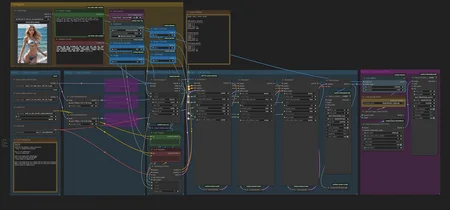
Credit to 3DBicioo for the 3-stage idea!
NOTE: I am taking a break from Civitai and I will not respond to any messages.
This workflow mitigates the current slow-motion issue with Lightx2v. Once that is fixed, this workflow is not necessary!
Lightx2v reduces WAN 2.2 generation time but makes the motions sluggish. This 3 stage workflow generates faster motions, and runs under 5 minutes on my 3090.
3 stages:
1) CFG 3.5, high model, 2 steps, euler beta
2) CFG 1, high model + Seko v1 high lora, 2 steps, euler beta
3) CFG 1, low model + seko v1 low lora, 2 steps, euler beta
I learned about the 3 stage approach from the lightx2v community posts:
https://huggingface.co/lightx2v/Wan2.2-Lightning/discussions/26
I hope by sharing this approach, more people can be excited about WAN2.2 right now, and we can have more WAN2.2 loras!
Description
This workflow supports:
Upscaling, 60fps interpolation
GGUF model
Lightx2v Lora
SageAttention
You can install SageAttention using this:
https://www.reddit.com/r/StableDiffusion/comments/1mdcjyw/finally_an_easy_installation_of_sage_attention_on/
Please upgrade to the latest ComfyUI. I used the following versions:
ComfyUI 0.3.49
ComfyUI_frontend v1.24.4
Download the models and place in the correct directory.
umt5_xxl_fp8_em4m3fn_scaled.safetensors
Place in models/text_encoders
wan_2.1_vae.safetensors
Place in models/vae
wan2.2_i2v_high_noise_14B_QX.gguf
wan2.2_i2v_low_noise_14B_QX.gguf
https://huggingface.co/bullerwins/Wan2.2-I2V-A14B-GGUF/tree/main
Choose a quantized model. I used Q6_K, but you can use a Q4_K_S if you have less VRAM.
Place these in models/unet
Wan2.2-I2V-A14B-4step-lora-rank64-Seko-V1-high-noise.safetensors
Wan2.2-I2V-A14B-4step-lora-rank64-Seko-V1-low-noise.safetensors
Download the high_noise_model.safetensor and low_noise_model.safetensor. I renamed these to Wan2.2-I2V-A14B-4step-lora-rank64-Seko-V1-(high-noise/low-noise)
Place these in models/loras
This workflow uses a 3 stage approach. The first stage uses the original WAN2.2 model, without Lightx2v lora. This allows for faster motions to be generated. The 2nd and 3rd stage uses the High and Low Lightx2v loras like normal.
Known issues
This approach still produces some artifacts such as flashing lights and "overbaked" colors sometimes. If this happens, try to increase to 12 steps and try again.
The interpolation model RIFE49 produces some motion artifacts (wavering background) especially with fast moving arms. I don't have a good workaround for this problem.
There are VRAM issues for some people, you can try deleting the ‘Patch Model Patcher Order’ Nodes.
Description
FAQ
Comments (56)
Hi, I wanted to try your workflow, but you know I have a problem: I get a memory error on the first KSampler with my RTX 3080 10GB. Is there any way to avoid this issue? What can I change in the workflow? I even set the resolution to 208, but it still gives the error—the memory goes up to 98% and then it crashes. It seems strange to me because I can use other workflows, even at resolutions like 540x960. ☹️
-----------------------------------------------
(FIXED) The problem was the 'Patch Model Patcher Order.' I deleted those nodes and, voilà, the workflow started working with 10GB VRAM. For anyone having VRAM issues, there’s your culprit.
Awesome, thanks for posting the fix
Thanks for sharing this knowledge. The motion is really great. really love your workflow.
Okay so if i understand correctly, this is what the workflow does:
1) CFG 3.5, high model, 2 steps, euler beta
2) CFG 1, high model + Seko v1 high lora, 2 steps, euler beta
3) CFG 1, low model + seko v1 low lora, 2 steps, euler beta
Will try that
dude, the quality! so far i have been stuck with the old 2.1 lightx because it seemed better, but now switching to the 2.2 and the tripple setup the videos are finally good. thank you sir
Yes exactly, thanks for the documentation!
i have to admit this looks great, but it took 2 hours and 16 min to produce a 5 second clip, i barely added the models, a pic and prompts and clicked run, so i don't know what's making this take so long, using 16gb VRAM 64gb RAM rig.
I’m guessing vram issues? But honestly not sure why it’s that slow for you. Here are some things you can try:
Try removing 'Patch Model Patcher Order.' Node.
You can also try adding blockswap node to offload some of the model to cpu. I haven’t tried this but I see it in other peoples workflows.
Also try using Q_4_S model?
Kyosukepure Yes, the ‘Patch Model Patcher Order’ node is responsible for the high VRAM usage, which is too much for 16GB. Q8 model without the node works.
@Kyosukepure I had a similar experience as skyrimer3d and I managed to fix it by adding WanVideoBlockSwap nodes between the model loaders and the LoRa loaders on all three paths. After that each run took only a couple of minutes.
@antonherker758 interesting i'll try that
@antonherker758 That worked great thanks! It went from 2 hours to 40 min. Using Q4 K S instead of Q8 reduced it to a bit more than 30 min. Now i'm trying to lower fps and image res to see if it can get even more reasonable timing. The animation is so much better than vanill wan 2.2 with lightx lora, i want to see if i can get it to a usable level of 10-15 min to produce a good video.
Congratulations on the realization of my idea
Oh nice, are you bicio78ita on Huggingface? I'd be happy to give you credit! :) Amazing idea and discovery. I by no means am trying to steal it, just wanted to share the workflow
The workflow is fast and the motion is nice. Great job!
- 1st sample(high) not use speed lora for make good motion. can use cfg 1+ (wow)
- 2nd sample(2nd high) use speed lora with cfg1 for faster gen.
- 3rd sample(low) use speed lora with cfg1 for faster gen.
- result : quite faster, nice motion.
- don't compare with 4steps WF, still 4steps wf's results are awful, esp motion slomo and dull.
Hello,
I hope someone can help me. In all workflows with wan 2.2 (including this one), I get the same error "
KSamplerAdvanced
Given groups=1, weight of size [5120, 36, 1, 2, 2], expected input[1, 32, 21, 104, 58] to have 36 channels, but got 32 channels instead
" I downloaded the correct models, but I still get this error. I updated comfyui to the latest version and still haven't solved the problem. Can anyone help me with a solution? Thanks in advance.
I think I had a similar issue. In my case, I was using the wrong clip, double check that you are using this clip model umt5_xxl_fp8_em4m3fn_scaled.safetensors
got to say, best workflow so far.
Any tips on how to reduce motion in this workflow?
Lower the cfg on KSampler 1 and increase Stage 2 or Total Steps
You can also remove stage one completely, that produces less motion.
You can also use a different sampler; euler produces the most motion; you can go with dpmpp_2m / simple for example
Ksampler advanced: 'GGUFModelPatcher' object is not subscriptable
me too,i don't konw why
I've changed the GGUF Loaders to the regular loaders and used scaled fp8 models. Other than that, the WF ist the same. Why is my image in the load image node ignored? Does someone know? It's like it's generating a T2V clip.
I keep getting this error, I have no problem it any other workflow...
Tried with 5070Ti 16 GB. Ignores the reference image, when it doesn't, looks very bad. How much VRAM did you use for this beautiful result?
my 3090 with 24GB goes on OOM (out of memory), max resolution I can go is 720p, probably the min card here is the 5090 with 32 GB of ram if not a better VRAM SUCH 48GB PROBABLY ... ME >>> SAD
Please try some of the tips in the other comments. Other people have succeeded with 16gb RAM! I used a 3090 with 24GB ram, no OOM, works with 720p but takes forever. I usually generate 480p then upscale. I used GGUF 6B.
Try deleting the patch order node.
Another suggestion from another user in the comment (I haven't tested this):
"""
I had a similar experience as skyrimer3d and I managed to fix it by adding WanVideoBlockSwap nodes between the model loaders and the LoRa loaders on all three paths. After that each run took only a couple of minutes.
"""
Hey I've solved my issue purchasing 96 GB of RAM, hope this helps!!!
The 3 Ksampler setup may be a workaround for the lightx2v slow motion issues however it seems to also cause the camera to either shake, bounce, or wobble in tandem with the subject's movement. For example, if the subject is walking towards the camera, the camera sort of bounces to each step more often than not. Imagine Godzilla walking towards you and you're backing away while filming it, every time it takes a step the ground shakes. I can't wait for lightx2v to be updated with the slow motion crap fixed.
I did some tests and found that 1024 res works great but 1280 still has the slow motion issue. Is there any solution?
I just noticed that too!
Good find, I didn't notice this. I was mainly generating at 480p and then upscaling. 1280 res took too long for me.
Wan2.2 KILLS 2.1, and I think the reason people dislike it is because its two models, its kind of a new thing, it can be tricky to setup, but when you get it set up proper, its smokes EVERYTHING, even the paid models. WELL WORTH the learning curve and the hassle.
OH, and if you're having artifact issues, try RIFE 47 instead. Doesn't always help, but in your situation it might.
Also, looking at this setup, without trying it, I'd actually opt for 3 steps on the first and second pass and 2 steps on the final pass, or maybe 3 2 2, I'd definitely give the unlightning-ed high pass one more step. That might actually solve all of the issues. (don't know yet, haven't tried this yet)
So I'm testing your workflow, I got ONE QUESTION so far, what are the little node, um, nodes. The connector spheres between connections that you can use to connect to multiple nodes... there are a few of them in "step 4" section on the left. WTF are those, they look handy.
Repeaters, not sure which pack they are from though. When you drag your output line into an empty space, I get a option to add a repeater. They are handy!
@Kyosukepure Yeah I ended up figuring it out. That shit's the bomb, especially when you're doing something with wan with extended video.
Hello I have been using ur worflow from a quite and gotta admit, it's wonderful!!
Only thing I want to ask is, why do you keep unloading and reloading the model among 3 calculations?
It takes about 2-5 minutes to do the calculation but loading and unloading the models and other calculations make the generation about 15 minutes in total for me, sometimes even more because it gets stuck on that for a long time.
Is there a solution to that? And unloading is essential among 3 calculations?
Thanks a bunch mate!
i added the unload because I think sometimes my GPU would run out of memory or crash. I think even if you remove the unload, the workflow will still have to load a new model at every sampler stage, because the high model and the low models are different.
Also, I love your work, amazing stuff! Keep on generating :)
Is there a way to use this without SageAttention?
expand the sage attention node and select disable
can i use FP8 instead of the GGUF?
yeah, you have to change the first block from a gguf loader to the other loader, can't remember off the top of my head. I would pull up another workflow and copy the fp8 loader from there.
That being said, I noticed some crashes on my system with the fp8 model, didn't figure out why.
@Kyosukepure its fine now, i used the gguf file. any tips if nipples of woman doesnt look good?
Very good workflow. Do someone have any tips to solve "torch.OutOfMemoryError: Allocation on device" when i trying Q4 or Q3 to generate 832, or even 624 resolution. Sometimes it works on 612 but I don't understand how to make it work.
My computer configuration: GTX 3060 - 12GB, 32GB RAM
You might need to turn on block swapping. Honestly, I haven't tried that, so your best bet is to look at some other workflows and pick what you like best from each of them and create your own.
I need help. All animations are as if they have ADD and in a rush shaking, bouncing, moving overly fast, etc. Can't do any normal NSFW position because it is acting like it will die if it slows down to a normal pace. This results in a really weird over aggressive exaggerated movements. I've tried disabling the first ksampler and step 1 but it gives an error.
I've tried setting the first one to 0 or even -1 but both give either grey distorted noise or start as a black image and fade into a messed up image. I've tried lowering stage 1 to 1 step and increasing stage 2 steps, or 1, increase stage 2 & 3 steps both, and nothing seems to work.
At this point I'm honestly at a loss on how to get this to produce proper animations. Any tips?
Hi thanks for the comment. Some ideas you could try, your mileage may vary:
Try to remove the "slow motion" from the negative prompt.
If you disable the first stage, then you need to move the latent image from the input of the first stage to the input of the second stage. You will also need to "enable" the "add_noise" on the second stage. Finally, change the block that is "first stage" to 0.
@Kyosukepure Wil check. Thanks.
I got a question, does anybody know if I add a Lora (a trained character) it will improve the video? and also whats the recommended VRAM for this, I'm using a 3060Ti 8GB but I can use a 32GB 5090, will it decrease the time?
maybe outdate? but very good workflow , high quality, 2 minutes in 4090