Update: WAN 2.2 Smooth Workflow v6.0 - 07/18/2026
"WAN 2.2 Smooth Workflow v6.0" update: The new version now has a First2LastFrame Workflow. Make sure to fully update your Comfyui and the extensions.
At the time of making the Showcase: Stability Matrix v2.16.1 and ComfyUI v.0.28.0.
Changed the Interpolation extension: Now using the ComfyUI-FrameInterpolation
Changed the default Resolution and added a recommended resolutions graph.
Changed the default Negative Prompt
Update a few some of the nodes
The videos on Showcase used the SmoothMix T2V v4.0
All Extensions for WAN 2.2 Smooth Workflow v6.0:
Update: WAN 2.2 Smooth Workflow v5.0 - 04/19/2026
"WAN 2.2 Smooth Workflow v5.0" update: The new version now has a First2LastFrame Workflow. Make sure to fully update your Comfyui and the extensions.
At the time of making the Showcase: Stability Matrix v2.15.7 and ComfyUI v.019.3.
Lightx2v Loras used:
HIGH with weight 1.0 -> high_noise_lora_rank64_lightx2v_4step_1022.safetensors
LOW with weight 1.5 - > lightx2v_T2V_14B_cfg_step_distill_v2_lora_rank128_bf16.safetensors
Still uses the same extensions as v4.0 - No need to install more. Make sure ComfyUI, its dependencies and the Extensions are fully updated.
The Showcase is focused on the usage of First2LastFrame since the other workflows are pretty much the same. Added some examples of Loops you can make. I might take a few tries but its possible to make something simple - keep Loops at 5 seconds at most - Wan 2.2 doesn't work very well above that threshold.
Updated Notes: Added mode hyperlinks for some of the Resources and Models Extensions used in the Workflow.
The videos on Showcase used the SmoothMix I2V v.2.
All Extensions for WAN 2.2 Smooth Workflow v5.0:
Links for MMAudio usage:
MMAudio NSFW Model (fine-tuned off the base model)
Put the MMAudio models on ComfyUI/models/mmaudio. Create the folder if it does not exist.
Update: WAN 2.2 Smooth Workflow v4.0 - 03/14/2026
"WAN 2.2 Smooth Workflow v4.0" update: A new version with a new Ksampler method and more functions. Make sure to fully update your Comfyui and the extensions.
NAG: Now uses Normalized Attention Guidance (NAG) in Ksamplers. Check the github page more info. It makes the negative prompt be effective even at CFG 1.0 for improved quality and control.
Adaptive Prompts: You can use Adaptive Prompts when writing your Positive prompt now. Check the github page more info. To check the choices made by the Node just open the Positive Prompt Subgraph.
Updated Notes: Added hyperlinks for all Extensions used in the Workflow. Other notes have been added and updated. There are alot of little notes everywhere. Make sure to read them. ^^
The videos on Showcase used the SmoothMix I2V v.2 and SmoothMix T2v V.3.
All Extensions for WAN 2.2 Smooth Workflow v4.0:
Update: WAN 2.2 Smooth Workflow v3.0 - 19/01/26
"WAN 2.2 Smooth Workflow v3.0" update: Its a big workflow now. Make sure to fully update your Comfyui and the extensions.
All in one: Txt2vid, Img2vid and Audio Options! You can now try adding audio to your videos.
Select your workflow: I tried to make it very simple to change between the Img2vid, Txt2vid and Audio Workflows.
New fps Output: I had to change the video outputs to 25fps to make sure the audio and video are in sync.
Multiple Notes: There are alot of little notes everywhere. Make sure to read them. ^^
Added Extensions:
It uses MMAudio. So install - ComfyUI-MMAudio Nightly
And its requirements:
MMAudio NSFW Model (fine-tuned off the base model)
Puts the MMAudio models on ComfyUI/models/mmaudio. Create the folder if it does not exist.
Small Update - 10/16
Small change made to "WAN 2.2 S. Workflow v2.0" and "WAN 2.2 Txt2Video Workflow v2.0" That should allow for a faster VAE Decoding.
Update: WAN 2.2 Txt2Video Workflow v2.0 - 10/08
"WAN 2.2 Txt2Video Workflow v2.0" update: now its SUPER simple and easy to use.
I made it to use with the Smooth Mix Txt2Vid Wan 2.2 Checkpoint! Make sure to try it! ^^
Here are my recommend video setting when using the workflow with SmoothMix Txt2Vid:
Low/Mid end PCs:
Set Steps to "6" on both KSamplers;
KSampler 1 -> end_at_step = "3";
KSampler 2 -> start_at_end = "3".
High end PCs:
Set Steps to "10" on both KSamplers;
KSampler 1 -> end_at_step = "5";
KSampler 2 -> start_at_end = "5".
Update: WAN 2.2 Smooth Workflow v2.0 - 09/29
"WAN 2.2 S. Workflow v2.0" update: now its SUPER simple and easy to use.
I made it to use with the Smooth Mix Wan 2.2 Checkpoint! Make sure to try it! ^^
All the videos on the showcase for WAN 2.2 S. Workflow v2.0 used Smooth Mix Wan 2.2 Checkpoint.
It does not has Florence anymore. Make sure to install and update all necessary extensions listed below. No new extensions where used.
Update: Adv. Workflow - 08/29
"Adv. WAN 2.2 S. Workflow" update: added the Node "Color Match" before 'Video Result' and 'Last Frame' to help with color consistency.
Update: Txt2Vid Workflow
Added a txt2vid workflow. Thanks for vinque for the suggestion. =)
Update: Adv. Workflow + First2Last Frame
Made a few adjustments to the basic workflow for these new version!
Both use the same tools/weights as the basic workflow so no need to install anything new if you can already use the basic one.
Both versions have "Power Loader Node" set for the High and Low Loras.
More Loras usually means more instructions put on the Positive Prompt so Florence2 is disabled by default.
To make a looping animation on First2Last Workflow make sure to set enough time for the AI to process the loop. Try 5 or 6 seconds.
WAN 2.2 SMOOTH WORKFLOW
PLEASE make sure to read everything.
Making a simple Workflow from Wan is tricky. Wan requires are more complicated set up to work. I'm going into this assuming you have read all tutorials necessary to make Wan 2.2 work on your PC as doing that here is unresonable.
WAB 2.2 is still pretty new and there is still alot to test. All images used on the Showcase use the same set of loras, weights and configurations. The only difference was the image used and the Positive Prompt. I tried using realistic, semirealistic and anime style to show that its possible to animated any style you want by using the configuration on this workflow.
So, before we begin, this Worflow uses the following:
Use the one that fits your own specs. The one used for the showcase was the "wan2.1-i2v-14b-720p-Q8_0" version.
Out of all Loras that increases generation speed this one has given me more consistenty results.
The one used for the showcase was the "Wan21_T2V_14B_lightx2v_cfg_step_distill_lora_rank32" version.
Of course you should test other versions or Loras that speed up generation as well as well.
Showout to @CubeyAI for the Loras. Without these making NSFW results was a pain, and we can't have that can we? Make sure to use the latest version of those Loras.
Used extensions:
==========================================================
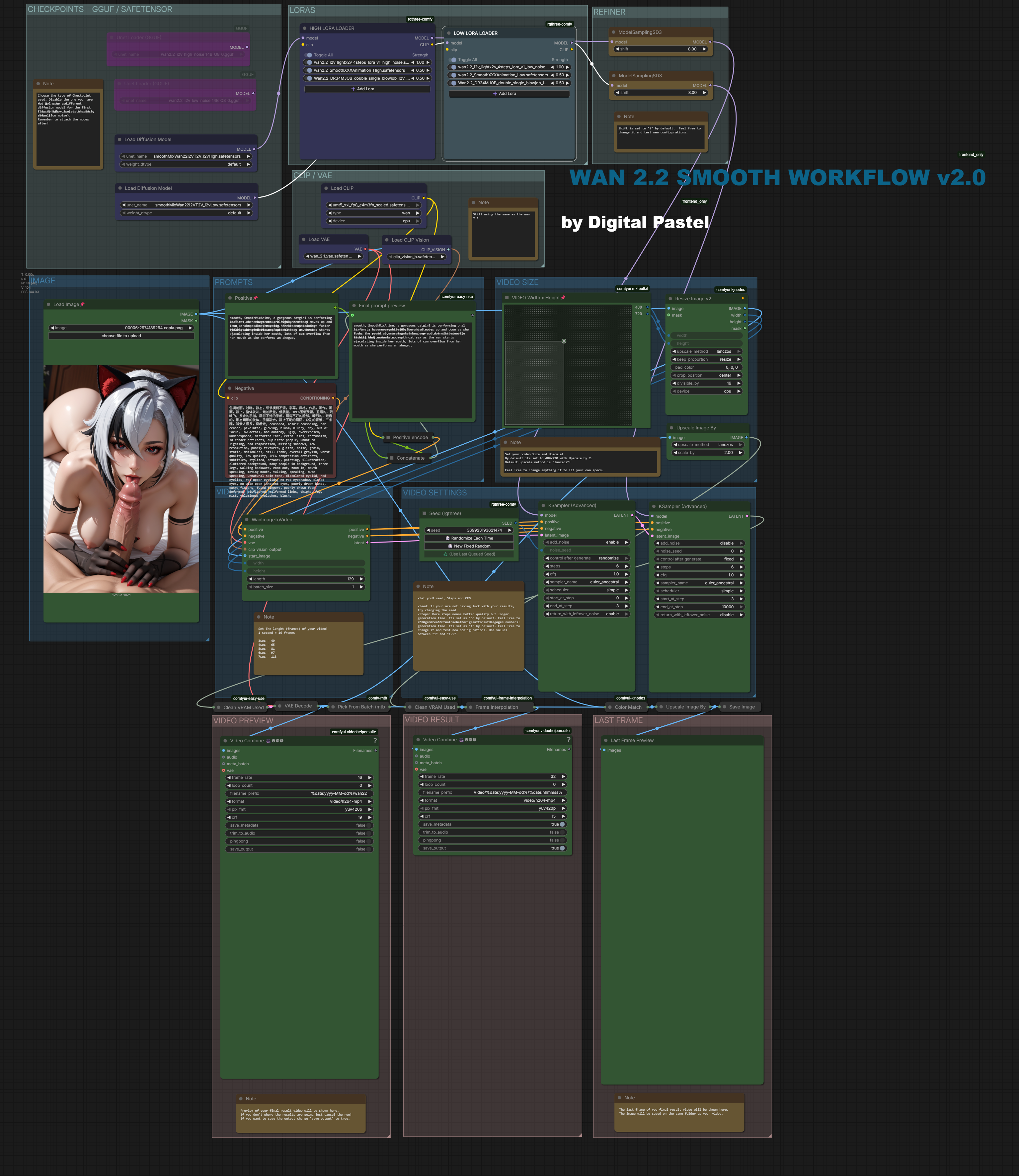
Its divided in sections to make it easy to navigate.
PROMPTS
Here is where the magic happens. So lets start here.
There are a few ways to use it:
TYPE NOTHING ON THE POSITIVE
By default Florence will create a prompt for you and a lot of times... thats enough lol. You don't need to type anything on the Positive. For examples of results that use an empty positive prompt check this and this.
I recommend you start by leaving the Positive Prompt empty at first. After you see the results you should begin working on your prompt if you did not like the results.
USE SIMPLE PROMPTS
Don't put a giant wall of text on the Positive Prompt as Florence will do that already. The showcase has Videos with very few prompts, some with just ONE.
DISABLE FLORENCE
If you really can't seem to get what you want disabling Florence might be the way to go.
FLORENCE
Choose your Florence model. Default model is "Florence-2-base-PromptGenv.2.0". Feel free to test other version or disable all of Florence nodes if you think its not helping.
CHECKPOINTS GGUF / SAFETENSOR
Very straight foward. Just choose your Checkpoint: GGUF or Safetensors. Disable the ones you are not going to use. Set to GGUF by default.
SPEEDING TOOLS AND LORAS
Here is where Sage and the Loras are set up. Feel free to change values or disable what you don't what to use.
CLIP / VAE
Still using the same as the wan 2.1
Text encoder: umt5_xxl_fp8_e4m3fn_scaled
VAE: Wan 2.1
IMAGE
Load your Image! :)
VIDEO SIZE
By default its set to 480x720 with Upscale by 2. That results in a 960x1440 video! Default upscale method is "lanczos"!
Feel free to change anything it to fit your own specs.
VIDEO LENGTH
Here you can adjust the video length.
By default is set to 81 or 5 seconds.
VIDEO SETTINGS
All settings here were set after testing. Feel free to change to your liking! :)
VIDEO PREVIEW/RESULT/LAST FRAME
You should be able to see how your video is turning out on the preview. If you don't where the results are going just cancel the run!
The video result is set to be at 30 fps. The video will be saved on Video/(Date_video_was_made).
The last frame of the video will be saved on the same folder as the video. You can use this to extent your videos! Check this post for examples.
====================================
Other recommend extensions:
Description
FAQ
Comments (151)
the best wan2.2 workflow for mid spec machine . Hope you can work on smooth wan animate .
The workflow works great! This is the first time I've used 2.2 coming from 2.1... how do folks keep consistent character faces? Most of mine are degrading or changing throughout the video.
I should specify that I'm using the Smooth Mix Wan 2.2 Hi/Low checkpoints as well for I2V. I've tried changing CFG 1.0-1.5, steps 4-10, sampler eulerA/uni_pc, scheduler simple/normal, upscale 1.3-2.0, and all my faces (mostly the eyes) degrade noticeably
In a couple hours both SmoothMix Txt2Vid and Smooth Txt2Vid Workflow v2.0 will be up!
Please be sure to read the article I posted as I will be out of reach for a while!
Have fun!
I used the I2V and F2LF workflows and they work very well with 16G VRAM, GGUF Q8 and 8 steps (I can't use your chekpoint, it's too large).
Where to get the NSFW lora in the workflow ?
AMAZING!
Great flow, thanks for sharing! But I have encountered an issue in F2LF flow result, the end few frame of the video always flash a yellow tint, may I ask if anyone else have run into the issue? I am generating 8-9 sec videos with it
Great Work! Thanks for sharing!
Lovely workflow. But more often than not something happens with the light in the videos I generate with it and that light usually becomes bright red; which is very distracting. Does anyone know how to solve that?
A little preview of my next release. Its a style Lora for Txt2Vid! All made with my Workflow.
Taking forever to make. I've been working on this for so long now. I really want this to be great.
Hopefully It will be out this week.
Thank you for your patience and support.
I just got in on everything and am having to scrounge up all the files that veterans have collected over time, im so close to having all the nodes but the ReActor nodes and the ergouzi nodes are killing me, I found the security ini and downloaded the mirror git (and it didnt like that). I just cant get those two things to go! does anyone know what i should be downloading? or renaming or moving or what have you?
Updating to the latest version of ComfyUI-KJNodes seems to break the image resize node and kill the i2v 2.0 workflow. Downgrading to 1.1.5 fixed it for me.
How do i start using your text - video workflow in Comfyui? Do i just download the workflow into the checkpoints model folder?
The workflow (json) file doesn't need to be stored anywhere in particular. You can just drag-and-drop it into the comfyui window (or in the corner of the ComfyUI window File->Open, or Ctrl+O) and it will load the workflow with all the nodes connected ready to run. You will need to ensure you have all the appropriate checkpoints etc. installed, and may have to install any missing custom nodes for it to run properly.
Thankyou my good man. This works very very well. No bullshit bells and whistles to add. And processing time has been cut immensely. Now generations are 3-4 mins each on my 16gb card.
Ah....wow! It works. It really, really works! THANK you for this. Just like that, I have my "go to" for WAN 2.2. This gets me re-excited about WAN, just when I was starting to give up on it. This and the checkpoint. Sending some buzz your way (tho it may not be worth the digital bits its printed on).
Small change made to "WAN 2.2 S. Workflow v2.0" and "WAN 2.2 Txt2Video Workflow v2.0" That should allow for a faster VAE Decoding. If you downloaded before try downloading it again! ^^
This thing is a total mind blinder, prompt adherence is crazy good. Pretty fast as well. What do you suggest I tinker with to improve face distortions and ghosting? And btw you're right no loras seems to do most things. killer job
Anyone running on 3060 ? should i use the q2 instead?
EDIT: The issue was partly with StabilityMatrix. If you're managing comfy with it, be sure to update it before updating comfyui.
Heads up: Updating comfyui today seems to break a ton of nodes in i2v 2.0, and I haven't found a way to fix it yet. Be careful updating.
Were you able to resolve this issue? i2v/t2v high works, but i2v/t2v low crashes.
I tried StabilityMatrix and standalone version, but they didn't help. Downgrading KJNodes to 1.1.5 didn't help either.
@OFRY I updated Stability Matrix, then went into comfyui manager and made sure all affected node packs were up to date and enabled. I'm not sure what you'd need to do if you have a direct install of comfy.
excellent workflow so simple and i can generate 480p in 20 sec and even push videos of 20 s long. in one gen. quality degrades a little is better short high quality but it works really well you model does everthing it needs to do. i could even generate 1024x1024 videso where in K3nk workflow it ROM error. congrats great fast and extremely succesful workflow.
tips just to try it for those wondering .go to any video generated here copy the prompt and see the resutls it shocks me how little loras i have to add 1 or none . very good.
only thing i will add is PNG unlimited videos like last frame first frame like K3nk one i added manually but it would be better to be integrated its better for "infinite" videos
Hello! I have a problem. If anyone has encountered something similar, please let me know. I generated several videos, experimenting only with the resolution and duration of the video. Then, when I reached a resolution of 1280x720, the video was generated and the result was not bad, so I decided to experiment with this resolution, but then every time there was a transition from hightnoiseKsampler to lownoiseKsampler, everything crashed, regardless of the resolution. Before that, everything was pretty cool.
In a way that is not yet clear to me, I solved the problem. Your models are great, I will continue testing them!
I experimented a little more and from my observations, to solve this problem, it may help to first generate the first generation in low quality 480p 32 frames without using Lora, and then the system will allow you to generate in high resolution. I am a beginner and do not know many nuances, but maybe this will help someone.
@Tratatatich Yeah, I’ve run into this issue too. Try queuing up several runs (1280x720) and just let them process — for me, the first one usually throws an out-of-memory error, but the rest complete fine. It doesn’t seem to be model-specific either; I’ve seen the same thing happen even with the regular Wan 2.2 FP8 Scaled build.
Works great but i keep getting text or signatures on my videos and im not using any loras other than the ones in the workflow, any ideas? I have tried changing the negative prompt to include words like text, signature etc but it still shows on final vid
Great workflow, works perfectly with smoothmix wan. Quick question: when i switch to gguf models, results become weird and blurry. No other changes. ANy idea why / how can i mitigate this?
You need to use speed Loras with them, like lightx2v or similar, on the High and Low Lora loaders.
Thank you for the quick response!
Hi DigitalPastel,
Thank you so much for putting together this guide. I've been out of the loop since SD 1.5 and tried following your guide step by step, but I couldn't figure out two things:
1. It preloads your low noise and high noise GGUFs. Is it possible to additionally use another diffusion model (eg. PonyXL?) Does the wiring need another LORA loader? Or does it have to replace one of the GGUFs?
2. Where do I connect the clips for the LORAs?
Hello, I followed the instruction but every time my result is like this, can anyone helps?
https://imgur.com/a/4fHsmu5
you're using i2v not t2v
Seems to work great so far with the Smooth Mix checkpoints! I have sage attention installed and I know it works on other workflows, but I can't find the option to toggle it on the WAN 2.2 S. Workflow v2.0.
Works great, finally one that works with rocm 7 and loras. But in my case i have super slow clip/text encoder, it takes 9 minutes to process positive/negative prompt, anyone know why it is happening?
I am using WAN 2.2 S. Workflow v2.0 which has 'Load Image' node but for some reason it is completely ignored. Any idea why?
I use smoothMixWan model.
I'm getting the same thing. Anyone know how to fix this issue?
In case you still have the problem, you probably have the t2v checkpoint or gguf version. I had the same problem
I am using your ‘First 2last frame’ workflow, which works great with your model and the new wan 2.2 lightx2v i2v moe model. I tested it for looping animations, and it works well even without significant seeding. There is only one problem, which is quite common, namely the colour change in the last frames. I am currently looking for a solution to this problem without using third-party programmes. I tried using the Color math node, but the results were even worse. If you have any ideas on how to fix this, I would like to try them.
I'm looking after the same solution, if I find, I'll tell you, or maybe you have already found a fix ?
I have the same issue. It's so annoying. Anyone have a fix for this?
I have the same problem during generation. If anyone finds a solution, please write it.
me too
Have all models but im getting error. What is my dumbass missing? "ModelSamplingSD3
'NoneType' object has no attribute 'clone'"
Having the same issue. It seems like a problem with the GGUF Loader. I cannot connect it to the Lora-Loader Nodes. I replaced it with the GGUFLoaderKJ node and it works but the results are not that good.
@Schwanentaucher i fixed this problem by having both low noise and high noise diffusion models active and selected at the same time
Anyone have tutorials how to add some control over consistency and face from start to finish with this workflow? good workflow btw
is there a workflow that includes loras?
Hello, thank you for your work, the workflows are awesome ! I have an error for img2vid, if someone can help :)
Failed to validate prompt for output 80:
* ImageResizeKJv2 64:
- Failed to convert an input value to a INT value: per_batch, <tr><td>Output: </td><td><b>1</b> x <b>480</b> x <b>720 | 3.96MB</b></td></tr>, invalid literal for int() with base 10: '<tr><td>Output: </td><td><b>1</b> x <b>480</b> x <b>720 | 3.96MB</b></td></tr>'
Thanks
The stuff it makes is really nice. HOWEVER,
I have a bouncing problem. Default settings, smoothMixWan22I2VT2V_, no LoRA, and simple prompt of asking for a slow zoom on the character and the character always starts rocking their hips and bouncing like crazy. What is going on??
Heyo. I have a problem with most of my generations where there's a lot of red noise in both the preview and the upscale.
Does anyone have any idea what could be causing this?
I had the same issue and I think it's a problem with speed up loras? But anyway you don't have to use the official model, just use smoothmix and remove all speed up loras and the red noise would be all gone
This workflow is fire bro!
Hey brother... Is there a way to connect an Upscaler Tensortt to your workflow before the generated video hits the output? Regular upscale just doesn't cut it... Trying to use an Upscaler i downloaded
Is this workflow not Blackwell friendly? Everything turns out blurry and grainy with my 5090.
absolutely amazing. the workflow makes sense and isn't overwhelming, and it works great.
Not sure why most of my videos come out in slow motion. How do I make them normal speed? Do I just change the frame rate?
increase the fps
make it around 24 if you are limited with vram else make it 30
@gamchitowel637 Thanks for the tip! I’ll give it a shot.
same problem, the 24 fps is in the first video helper and in the second 48?
@nachofilms80 It's a bit strange — when I use T2V with a total of 163 frames and set the frame rate to 32 fps/64 fps to generate a 5-second video, the playback speed looks normal.
However, when I use I2V with the same settings, the video plays back too fast.
To make the playback speed normal in I2V, I have to reduce the total frames to 81 and use 16 fps/32 fps for a 5-second video.
why does the image have nothing to do with the generation? only the promt, first to last frame also does not look at the images.
guys, if anyone needs it, smoothmix has t2v by default, not i2v on civtai, so if the image doesn't work, take a closer look)
How to set up I2V
@ogg797 What stage are you at?
I never thought I would get into Video generation but your WF is fantastic and made this experience a fucking breeze! TY!
amazing workflow! But I was wondering how I can get the I2V workflow? I can't find the link to it on this page.
This works great, thank you ♥
HELP!! img2vid not working for me, it is creating a completely new video, dont you the image at all.
Use the image to video checkpoint not the text2video.
Thanks for introducing me to the "VIDEO Width x Height" and that part of the workflow. It's a lifechanger
Thank you senpai. I mean seriously. I have been trying to figure out things with some decent but mostly bad results. Now I have an awesome workflow that just works and now I can learn things by trial and error. Thanks so much for the time invested in this series.
Frustrating. T2V working OK or at least working. I2V throw the same old error (for me): Given groups=1, weight of size [5120, 36, 1, 2, 2], expected input[1, 32, 21, 80, 60] to have 36 channels, but got 32 channels instead.
I cannot jump from Wan2.1 to Wan2.2 because of this. Has anyone any idea what's going on here?
GOT IT!
I've moved away the folder "flow2-wan-video" from custom_nodes and now is working like a charm! But I have no idea why, and have to test other workflows too for any changes and errors.
Thank you for your great work!
My videos look jagged / pixelated almost like it wont upscale nicely, any tips to increase image quality? source images are 2k resolution
What's the video res? Downscale your images and try lower res and upscale using either Compact (GAN) or FlashVSR (Better)
Hi, I'm trying to create a loop video with the First2Last workflow by input the same image to both start frame and end frame but unfortunately I'm getting this strange color shift when the video loops which cause the transition to not be as smooth as expected. Got any ideas how to fix it?
Any help on ComfyUI "pause" when workflow's at the first "clean VRAM used" ??
Is my PC too weak for this ? (My setup: RTX 3060 12gb + 16gb ram).
Obs: I did try with Q8 and Q5 GGUF
Such VRAM cleaner nodes don't help me either.
Quants of what? You can also try quantized umt5. You can also try lower quants of the unet because it's larger
Increase the paging file
Personally, before I increased it from 16 GB to 64 GB, even the Q3_K_M model crashed
By increasing the paging file, I was able to run the Q5_K_M (RTX 4060 8GB, 16 GB RAM)
I was running this on vast.ai and had this problem. I bypassed the Clean VRAM nodes and things started working again.
Comfy just disconnects and stops when it should load the low noise model. But I can sometimes gen 2 videos before this happends.
16GB Vram
32GB Ram
add loras how????????
In the loras node, there's a button that says "Add Lora" click on that and a new selection option will appear for additional loras. By default you have 1 option for a lora but can add multiple
If I want slower FPS(8 instead of 16 for example) is it possible to adjust?
when load the workflow none of the nodes are connected and have no loaders attached? can someone just link me an example of a connected workflow? almost not even willing to use this because not even set up for me on load.
I've spent hours upon hours, working on different workflows, looking them up on civitai, modifying building them and no go... This though
First workflow to work so effortlessly and quickly major major prompts to the creator, 10/10 love you
Am I the only one having issues with VIDEO Width x Height node? I have image 800 x 1280. I can t set these settings in this node. How can I replace this with standard one that we can set the output video size manually?
I’m experiencing the same issue. Have you managed to fix it?
Could you recommend a guide/YT video on correct checpoints/extra installation?
Why is there a Unet Loader and also a Load Diffusion Model? I understand that you use one or the other. But wouldn't a model/checkpoint always be loaded the same way?
What's the difference in the model/checkpoint given to each?
ps - thanks for an awesome workflow
Do you have an I2V workflow?
TIA
He, fellas. Quick question. I don't understand what the "crf" means in the "Video Combine" nodes does and if it has any influence on the generated video. Can someone explain, please?
CRF pertains to the compression of the file. If you want a near-lossless file with the best quality, keep CRF around 8 (lower number is better, but 8 is basically perceptually lossless)
@dreadinterface My man! Thanks so much, mate!
Just want to say great to see someone else discussing the elements of the workflow instead of just running it and thinking that's all you have to do.
@Kinglink Can't run a workflow properly without understanding it first, mate. Just doing "the thing" without knowing how and what exactly is done is simply stupid in my eyes^^
Thanks for the effort and share ♥
It is the best model/workflow pair since I was started to Generate Locally. With 12GB 3060OC, I am very thankful.
[???]
1) I want to ask if it is possible:
Vid2Vid models/workflows made by you.
Sorry for bad England.
İyi forumlar.
Hello, I have several questions regarding Img2Vid
-----
>Lora to Increase speed Generation "Wan21_T2V_14B_lightx2v_cfg_step_distill_lora_rank32"
1) Where does this go? In "High Lora Loader" or "Low Lora loader? Clarifying this would help complete noobs like me!
------
2) When I'm using "Smooth Mix Wan 2.2" I have downloaded two files for ITV
smoothMixWan22I2VT2V_i2vHigh.safetensors
smoothMixWan22I2VT2V_i2vLow.safetensors
The problem is that at some point during the generation I get an error saying "Reconnecting" in the ComfyUI. Is this just my poor hardware?
I'm running 3060 12GB - 32GB RAM.
--------
3) I want to make NSFW videos, so I downloaded
"wan 2.2 experimental) WAN General NSFW model" that you linked which got two files
>NSFW-22-H-e8.safetensors
>NSFW-22-L-e8.safetensors
I put H in "High Lora loader" - L "Low Lora loader", that's correct right? Just to make sure.
I also downloaded "SmoothMix Animations" and did the same thing with
>SmoothXXXAnimation_High.safetensors
>SmoothXXXAnimation_Low.safetensors
I have the 4 loaded at the same time. Is this ok?
----
Up until now I've managed to only generate video with
wan2.2_i2v_high_noise_14B_Q3_K_S.gguf
wan2.2_i2v_low_noise_14B_Q3_K_S.gguf
Thanks for the help
where to download the i2v workflow?
Hi, I believe it's "Wan 2.2 Smooth Workflow", at the time of writing this is the fourth option at the top of the page. Select that then click on the download icon located on the right of the screen
EDIT: So after trying several solutions, I simply disabled the speed up nodes. Even without those, the gen speeds are fairly quick on a 16Gigs 4090.
Hello, I'm having issue, when the workflow gets to KSampler, it fails because it cannot find sageattention module. Installed it through manager but it still doesn't work. Any ideas? Thanks for the workflow, this looks very promising!
Easiest way to get that installed is to search for comfyui easy installer and should be the first thing that comes up a github under the name Tavris1. Comes with a simple bat that will install comfyui and then after it installs has a addons folder with other bats to get SageAttention installed along with Nunchaku, Insightface, and FlashAttention. Its pretty nice really, so if you are looking to ever just do a fresh install and get your comfyui cleaned up I would check that one out, just run that and move your models from your old one over to the new one.
the mtb node set is not compatible now, can you make a new workflow without it? it try to open a workflow to edit, always got error, thankyou
If I want to use NAG instead of a higher cfg; do I just add, wanvideoNAG, between modelsmaplingsd3 and high sampler, then connect negative prompt node to NAG's condition?
Was expecting this to be more "hype" for workflows/models that don't turn out imageslike this, but using your model... This turns out INCREDIBLE videos, and they look amazing.
Excellent Workflow that doesn't require a million random plugins as well. Great job. Easily my favorite download I have EVER made on this site.
Using Image to video using this workflow, The face/eyes are kinda blurry/distorted. Does anyone know what causes this?
having this issue too, if anyone knows the issue or how to fix that would be great
Incredible! I love this workflow!
Are there any lightning loras that can make this faster?
Hi, which workflow must be use to realize i2v with wan2.2 smooth model (realism) ?
dumb question, how do I download the missing nodes after opening the workflow?
Go into Manager on the top right and there'll be an option that says Install Missing Nodes
@Lexcorp_AI This doesn't work, the install missing nodes page is blank. Yet I'm missing the clip Vision node
I tried this today after using native i2v in ComfyUI. Initially, I used the same LoRa as in native, as I thought it wouldn't work without LoRa, just like in native, and the results were terrible... Then I decided to try it without LoRa, and wow! Pure magic. On an RTX 4070 Ti Super, the generation time at 1024x1024 resolution (6 steps) is about 450 seconds (with sageattention2). Same as in native, but the quality is much better!!And it's predictable.
Prompt execution failed
Cannot execute because a node is missing the class_type property.: Node ID '#61'
What could it be ? do you guys have a solution ?Thank you!
bypass the gcuf loaders and connect the stable diffusor nodes right beneath. Then connect them.
Everything looks anime though
any idea how to change pytorch version from 2.9.1 to 2.9.0 in comfyui to install sageattention for 2.9.0?
activate you python environment then
"pip uninstall torch torchvision" to remove current torch, followed by
"pip install torch==2.9.0 torchvision --index-url https://download.pytorch.org/whl/cu128" or cu130 in the url if you need cuda 13 (depending on your environment).
Hello, I'm having ussue with custom WAN 2.2 checkpoints, and I could use a bit of help:
output example: https://civitai.com/posts/25356948
As you can see, my results are atrocious, and I don't know why, because I'm a total noob at using comfyui...
Here's the image of the workflow (it's yours)
https://files.catbox.moe/ylt5cv.png
Any help would be appreciated.
Good job, the txt2v works as expected. On my RTX 4080 16gb it takes around 4 minutes to make a 7second video. The i2v version does not create a video anything like the picture for whatever reason.
no matter what i do i cant acquire the quality you have shown for the lesbian shower and the massage parlor. im experimenting with different lightvx2s, scheduelers and steps but dont even come close.
You most likely need a third party upscaler. Upscale it to high resolution and 60+ fps.
Best workflow + ckpt I found till now for Wan I2V, if I can ask I would love to have a loop feature in the future versions, thanks a lot
This is my first time using a workflow for videos. I’m using yours with the IMG2VID option, but a few things are happening.
First, it seems like the image I provided is being completely ignored.
Second, the generated video looks “blurry.”
Do you have any tips on how to use it correctly? I have an RTX 5070 Ti.
Did you ever figure this out? I am noticing the eyes of models looking watery and blurry.
You need a lora.
Very helpful workflow, got me going on Wan 2.2 successfully! One thing I find is that the ai seems bent on making my videos loop, with the last second or two of the video "returning" to the start position. I have no idea that is happening because of the model or the workflow (or something else) but is there a setting I can turn off somewhere?
How long are the videos? I have that happen a lot when videos get to around 7+ seconds.
Thanks for your reply. I learned more about this since I posted...turns out Wan 2.2 was trained on 5 second videos, so the only reliable way to prevent this is to limit your videos to 81 frames.
@dayruner643365 6 seconds seems to work fine for me with the adv s workflow. But yeah for longer videos we need a workflow that uses SVI 2 pro, I kind of prefer that setup in a way so that it's not built into the generation process and just rather a load video and then I can sort of just play more like a director and prompt in the things I want to add one prompt at a time. Going to try and hopefully figure out how to take most of this advance workflow and work that in.
Hi! I’m running your workflow with these UNETs:
wan2.2_i2v_high_noise_14B_Q8_0.gguf
wan2.2_i2v_low_noise_14B_Q8_0.gguf
I kept the VAE as wan_2.1_vae.safetensors and hit:
RuntimeError: Given groups=1, weight [5120, 36, ...] expected input ... to have 36 channels, but got 32
and when swapping VAEs: multiple size mismatch errors for WanVAE layers.
Could you clarify:
Which VAE file (and channel count) should be used with WAN 2.2 I2V GGUF in your workflow?
Are you using the HyVideo VAE Loader (video VAE) instead of the standard Load VAE node?
If possible, a link to the exact VAE you used or the expected filenames.
Thanks a lot!
I think you need .safetensor checkpoints and not gguf for these workflows. Although, I am not sure, I am only using one.
You can run .gguf. Some have found the WanImageToVideo (flow2) custom node to cause this. Deleting the folder from the custom nodes folder worked. For me, a fresh install of ComfyUI was the only fix.
Any ways to prevent saving an extra image? I assume its the starting frame? I can turn off saving the last frame, but I still see another image being saved.
I'm using the final (2.0) t2v version with the smoothMixWan models. I've used both the .gguf and .safetensors versions, but for some reason, it seems the workflow is ignoring the loras I'm adding.
Currently, I'm using the combination smoothMixWan22T2V_highQ80/smoothMixWan22T2V_lowQ80 and the loras (weighted 1) 985347-wan22_14B-high-Nfj1nx-e71.safetensors/985347-wan22_14B-low-Nfj1nx-e65. Could you help me understand what I'm doing wrong?
The video is generated with incredible quality, but it seems to ignore the character lora.
This workflow is awesome, stable, quick and produces amazing results. I'm using the advanced version but had to disable the Sage Attention KJ nodes because I couldn't get them to work. Other than that, this one is by far the best workflow I've ever tested.
What is this CLIP VISION encoder in the workflow? it's never mentioned in the description
I set the length to 161 which is 10 seconds and fps to 60 for result video. In the video preview, it is 10 seconds. However, after it combines, the resulting video is 5 seconds. Anyone know what I am doing wrong? I want the resulting video to be 10 seconds.
161 is 10 seconds at 16 FPS (10 *16 + 1)
@MMOFan You just repeated what I stated lol
@hereandnow931 no you misunderstand the length has to be the number of seconds times frames per second if you chose 60 frames per second that’s 10×60+1 = 601
You increased the speed your final video goes through the frames without adding an equivalent number of extra frames. Effectively, your final video is running at double speed. You'd need to add ~3 interpolated frames for each generated frame, instead of 1.
@MMOFan you cannot put 601 and put the preview vid at fps 60. Either that will take hours or the program will crash. That is not logical. That is why we have upscaling. Video preview is always fps 16 or less so that is 161. Resulting video can be upscaled to increase fps to 60.
@hereandnow931 I'm telling him to change FPS to 16 INSTEAD of 60