Update 08/08/2025
There was an error in the link I shared for the Lighting 2.2 I2V LoRA by Kijai. I’ve just fixed it so you can download it now.
---------
Update 07/08/2025
What I’ll say next is my personal opinion — I could be wrong — but based on the few tests I’ve done, this is my conclusion.
The more steps you use, the lower the strength you should assign to the lighting LoRAs. For example, I believe that for 6+6 or 7+7 steps, a strength of 1.0 is appropriate.
I think different configurations not only affect generation speed but also the movement itself.
Personally, using 6+6 or 7+7 steps with KSampler and LoRA strength at 1.0 gives more natural character movements, without losing image quality. The downside is that it's slower, whether you're using Lightning 2.2 or Lightx2 2.1 T2V.
On the other hand, using 4+4 steps with a strength of around 1.50 for high and 1.20 for low results in simpler movements and only a slight reduction in quality, but it’s much faster. That setup might be useful for certain types of animations.
LCM Sampler also seems to work.
You can run your own tests with different sampler and lighting LoRA configurations.
Lightx2v Actual Kijai Lora speed for 2.2: https://huggingface.co/Kijai/WanVideo_comfy/tree/main/Wan22-Lightning
----------
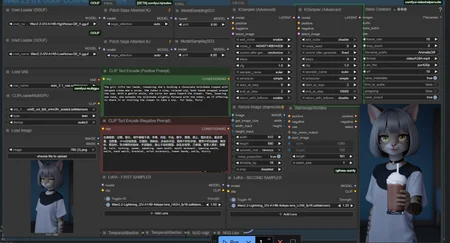
I made a compact WF for WAN 2.2 GGUF
Links:
Lora Lightx2v (wan 2.1-But it might still be compatible.): https://huggingface.co/Kijai/WanVideo_comfy/tree/main/Lightx2v
GGUF: https://huggingface.co/QuantStack/Wan2.2-I2V-A14B-GGUF/tree/main
or https://huggingface.co/bullerwins/Wan2.2-I2V-A14B-GGUF/tree/main
You need a High model and a Low model with the same quantization. The VAE is the same as WAN 2.1.
Make sure to update your ComfyUI.
Description
new acceleration loras with their respective adjustments
FAQ
Comments (33)
Little help? Everything turns blurry extremely quickly. I bypassed the sage attention, compatibility issues..., but that should only make things slower, not wreck the gen, right?
The files I'm using:
Checkpoint
from https://huggingface.co/QuantStack/Wan2.2-I2V-A14B-GGUF/tree/main
Wan2.2-I2V-A14B-HighNoise-Q6_K and Wan2.2-I2V-A14B-LowNoise-Q6_K.gguf.
The four step loras from
were named high_noise_model and Low_noise_model. I changed the names for my clarification to Wan2.2-I2V-A14B-4steps-lora-rank64-Seko-V1_high_noise_model and Wan2.2-I2V-A14B-4steps-lora-rank64-Seko-V1_low_noise_model
Those are the only changes that I have made to the flow. Any thoughts?
Got blurry for me too after first second. Using the Q8 versions with Sage Attention. Fixed it I think by using the "Lightxv_I2V_14b_480p_cfg_step_distill_rank128_BF16.safetensors" Lora in both the high and low Lora boxes instead of the "Wan2.2-Lightning" lora in the workflow.
Hello, I sent the wrong link and I’m not sure how it happened. The correct link for the Kiaji Lightning LoRA i2v is this one:
https://huggingface.co/Kijai/WanVideo_comfy/tree/main/Wan22-Lightning
Sorry for the confusion, I hope this clears things up.
Kaymart Replying to the main comment
https://huggingface.co/Kijai/WanVideo_comfy/tree/main/Wan22-Lightning
should be noted for anyone else running into this in the future, for some reason, mine didn't have the loras set up correctly. let this run for 50 minutes and got this guy's issue but like the girl i was genning looked like a ghost lol.
had to add in new lora nodes, it seems that particular pack is busted on my end.
Kaymart I am trying to use "Lightxv_I2V_14b_480p_cfg_step_distill_rank128_BF16.safetensors , it gave me lora key not loaded error
i tried Lightxv_I2V_14b_480p_cfg_step_distill_rank32_BF16.safetensors as well
i used wan2.2-lightning the original version and kijai's vesion
same error
can you help me please ? any clue ?
Got this workflow yester. And wow, for how fast and the quality you get Nice work on this WF. I have played around with a lot of workflows. So far This is one of the betters. Hope maybe to see an upscale added later. But great job.
help? it tells me i need to install wanskipendframimagesF@ which node suite is that ?
First, try removing it — it’s right under the Video Combine. If you notice that the last frame has a color issue, try installing https://github.com/Flow-two/ComfyUI-WanStartEndFramesNative to get the Skip Frame node.
Thank you for the WF and the explanation on the setps/lora strength.
got this error with all nodes working : ModuleNotFoundError: No module named 'sageattention'
Maybe it’s the Patch Sage Attention KJ node—try bypassing it. This node should speed up generation a bit. There are simple guides for its installation.
Is there any way to add a lora onto this workflow? I get errors every time I try to load one
It seems i can't speed up this workflow whatsoever. Bringing the lora strengths up to 1.20 each caused the video to look like a gray image, and previously it had a few bugs at mostly stock settings, 2 steps per pass.
Attaching two videos with the workflows, if anyone can give me pointers on perfecting the quality/speed tradeoff i'd hugely appreciate it. I'm on a gtx 1080 8gb, will be upgrading to a 5060 ti 16gb but for now i wanna push this old girl.
-My best so far-
https://files.catbox.moe/u0x9rr.mp4
-Weird gray image-
https://files.catbox.moe/revtvp.mp4
Altogether i get 12:55 mins per iteration at best, have tried Euler/UniPC/LCM at simple, and none have changed the speed whatsoever.
Are you using GGUF 6? Maybe you should use Q4 or the 5B version because of the type of GPU you have. If you already are, then I wouldn’t know how to help.
EechiZero GGUF Q3. Oh well, i can hope someone else will chime in lol this is a good workflow.
Amazing workflow - thank you!
For anyone struggling with blurry images, try cropping the starting image instead of preserving the aspect ratio during rescale. Fixed all my issues.
How do you do that? Can you give me a specific example?
HolyTower Try enabling crop in the resize image node
4060ti 16gb vram
32gb ram
880x512
101 lenght
triton
220 seconds
368x480. 81l. 65seconds.
same i have this is gud or not can u help e to speed work flow m New here
I keep getting blurry and distorted videos. Is there any specific guide that could tell me exactly what top download, how to set it up and adjust it?
I reallly like your workflow, did you do anything to load the Wan models one after the other or anything that uses the memory in a different way ?
How to made it with 32fps?
Please help!!!
Where to download workflow, I am noob here? O only know I can paste image in comfyui and it can return workflow, but it doesn't work here. I will be grateful. Oh shit it's in zip file, anyway if you know tell other ways of getting workflows.
Do you have a workflow that include adding wan 2.2 extra loras ? like high /low compatible loras ?
after installing sage and triton, 1.2 works really well. Can you make another workflow for First frame to Last frame?
I'll upload one soon; I have to reorganize it first.
Still works with Kijas Lightx2v, takes 2-4 minutes to generate 👍
Heck yeah thanks finally got a gguf workflow working with yours. Thank you!
为什么我下载了高频和低频模型后 工作流中uned gguf 好像识别不到他 ,我要怎么做 更换节点吗
when i use sage attention
ModuleNotFoundError: No module named 'sageattention'
why is that? my python is 3.13
pip install sageattention