


All versions are good. Each one offers a different style. Pick the one that fits your vibe best!
More details about each version are listed at the bottom.
Increase the [color] silhouette weight if necessary. For example: (green silhouette: 1.2)
Flat color is not needed unless you want flat color.
Please comment your thoughts on this Lora and share your results.
Color Silhouette
Color Silhouette transforms your generations into bold, flat compositions using clean, solid-color silhouettes with few details.
Whether it’s a person, anthro, or animal, this LoRA simplifies the subject into a single-color shape and places it against high-contrast backgrounds. It works great for graphic-style compositions, posters, or visual experimentation.
Trigger Word: color_silhouette, [color] silhouette
Helpful Word: no outline, no lineart, flat color, eyeless,
Race: Human, furry, etc (The V2 training data includes furries, humans, and objects.)
Replace [color] with red, blue, green, purple, yellow, or any tone that fits your vision.
Increase the [color] silhouette weight if necessary. For example: (green silhouette: 1.2)
As always, adjust weight if needed. I use 1-1.2 most of the time.
Personal Note
I noticed silhouettes are almost always done in black, and it’s really hard to push creativity when everything paint with a same color. So, I made this LoRA to unlock the freedom of color silhouettes.
Version:
V3 (Great for detailed background): Revamp the training data. Fixed circular background and significantly reduced minimalism. Less impact on any checkpoint styles. This basically means it improves the ability to use checkpoints with less overwriting.
V2 (Great for balance between minimal and detail): Solve the background issue and provide more flexibility. Reduce interference with the background. Less minimal overall. Less prompting is required to obtain a background.
V1 (Great for very minimal): Very strong minimal. Use this one if you really want minimal. You will need to do extra prompt to get what you want.
Note: You can used NoobAI and IL for this. Don't forget to turn on ADVANCED MODE in your Account Settings > Generation Settings.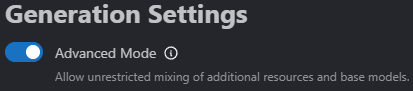 This will allow you to use NoobAI checkpoints with this IL LoRA.
Description
FAQ
Comments (4)
Awesome style!
I actually like your images result! It looks better than I thought it would.
Amaaazing!!! ❤
Really like your loras, they push generations to be more experimental, which i like a lot, specially when we talking about lighting,
Incredible!!! keep going bringing us your works! ❤
Hell yeah! Keep pushing hard to break the barrier of IL/NoobAI. That’s my goal with this LoRA. Break it to open up new creative opportunities. I was so frustrated last week that I couldn’t change the silhouette color at all. IL and NoobAI were being so stubborn with black only silhouette. So I just SLAPPED it with a LoRA.
Details
Available On (1 platform)
Same model published on other platforms. May have additional downloads or version variants.