EZ Regional Prompting
🚀 What You Need:
Nothing, no need for 150 custom nodes.
If you want to use a ControlNet, you will need comfyui_controlnet_aux custom nodes (https://github.com/Fannovel16/comfyui_controlnet_aux)
🌐 Guide:
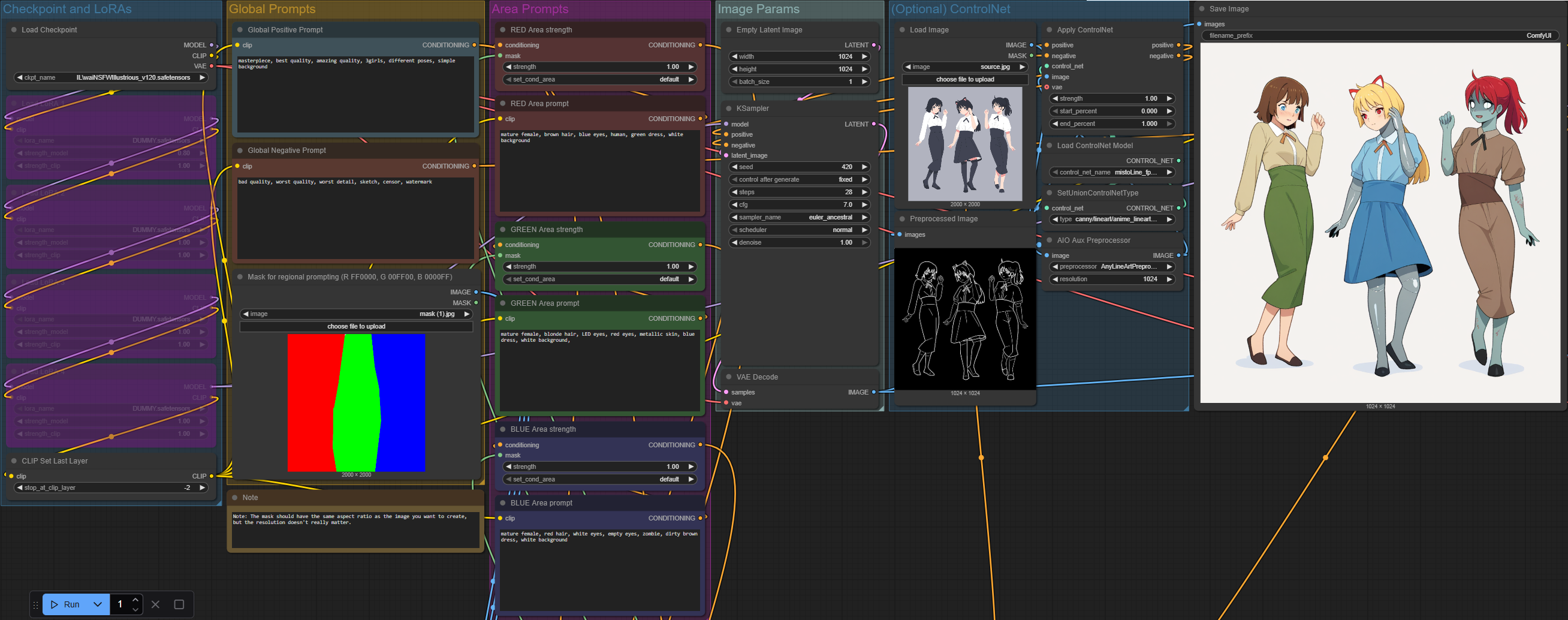
Create Your Mask:
Design a mask image using three solid colors:
Red (FF0000) for Region 1.
Green (00FF00) for Region 2.
Blue (0000FF) for Region 3.
If you only need two regions, leave one color unused.
Load the Mask:
Upload the mask image in the mask input field.
Enter Your Prompts:
Global Prompt: Applies to the entire image.
Regional Prompts: Define specific prompts for each region (Red, Green, Blue).
Leave the prompt empty for any unused region.
Optional: Use with Loras:
Load your LoRAs and use them where you want.
⚡ Why This Workflow?
Fastest Regional Prompting: Minimal setup: No Overhead. No Useless Complexity.
Simplicity First: No unnecessary nodes or complex configurations.
ControlNet nodes included.
Upscaling nodes included.
Enjoy a streamlined, efficient approach to regional prompting.
Description
FAQ
Comments (12)
so sorry, does this work with forge UI and if so how to install it?
This isn't for forge, sorry. You need comfyui https://github.com/comfyanonymous/ComfyUI
Hey, civitai has a problem and your workflow isn't downloading. Please give another link.
I just downloaded the first image and dragged it into ComfyUI, you can load the workflow that way.
The workflow works like a charm, and i'm loving what I'm able to generate AND the simplicity of it.
I'm having big trouble when I try and use two custom loras, as the subjects keep on merging together, if the output is even recognizable and not some kind of puffy smoke. (the nightmare fuels still keep on occupying their assigned chunk of image, so I know the workflow is still working). The graphical effect tho is the same of just using the loras together without any form of regional prompting.
Any idea?
how would i go about inpainting using this? if that's even possible, thanks
Hey, any update to this?
If I set set_cond to default then it doesn't actually draw in all 3 sections. Like if I do 3 people, splitting a landscape resolution into thirds, it'll only make 2 people most of the time. If I set it to mask bounds it always nails the 3 regions perfectly, but they generate as 3 seperate images rather than merging them together with the background. Any idea what I'm doing wrong?
I can get the workflow to work, the truest problem is getting it to render according to my mask. i wish there was a mask strenght in there - not for each color but fort hte image itself. It keeps generating the strangest things instead of what is drawn.
Also wish it came witht he Lora manager custom nodes - I'm staring at your work right now trying to understand how to plug those in if it's possible.
i started using comfyui just 10 days ago, and this workflow is the most basic for regional prompting which i found after 5 hours of search , guess i will try this and edit it like adding power lora loader and efficent loader + ksampler, thanks .
Praise the Lord, a regional prompting workflow that, well, works! Thank you so much.
gg works well