


[Recent Changes]
I have updated v1.1 beta to v1.11. The nodes have been replaced with new ones to better support multiple LoRAs, and some width and height nodes in the v2v group have been modified to make resolution adjustments easier.
+(v1.11)Fixed an issue with incorrect connections between the output and decode nodes. If you have downloaded a previous version, please download it again.
+There may be issues with the latest version of ComfyUI. If you encounter problems with InstructPixToPixConditioning node, use 'Switch ComfyUI' in the ComfyUI Manager to roll back to version v0.3.13 and then restart ComfyUI.
LoRA can be dynamically applied based on the situation, adjusting to different stages of generation.
This is not a workflow I implemented, but the original author has mentioned that uploading it to Civitai under my account is fine if desired. For convenience, I have modified some nodes and am sharing it here.
Most LoRAs for Hunyuan Video are trained for real-life humans, which can cause various issues when applied to 2D characters. This workflow enables LoRAs to be applied at different stages to mitigate these problems.
I primarily use this for anime-style video generation, but I believe it will also be beneficial for real-life human subjects.
+If any group names or notes seem a bit off, it's probably due to my English skills. I appreciate your understanding!
I have uploaded two versions of the workflow:
Includes Tea Cache and Wavespeed
Uses only ComfyUI core nodes (Tea Cache and Wavespeed removed to avoid potential issues in some environments).
⚠️ The version with Tea Cache and Wavespeed may cause issues in some environments (especially on Windows without Triton). If you experience problems, try using the core-only version.
I do not cherry-pick results, so the explanations are based on images generated after modifying the workflow.
T2V Generation Example:
Same prompt, same seed, and all settings fixed.
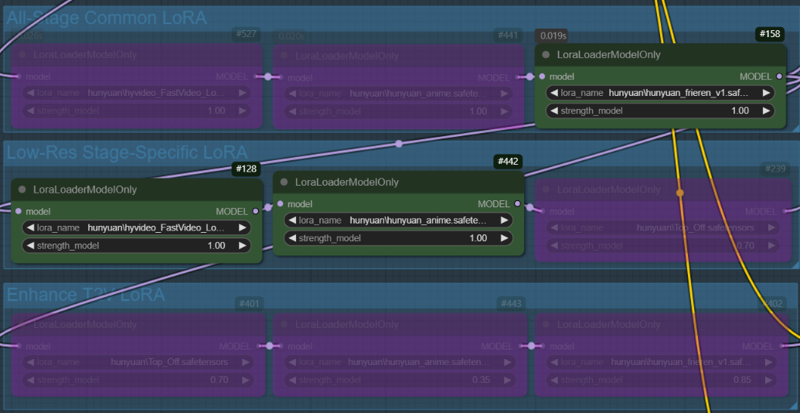
Case 1: A character LoRA is used across all nodes. In the low-res stage, the fast LoRA and style LoRA are applied, while no LoRA is used in the enhance T2V stage(In this stage, only the all-stage LoRA (character LoRA) is applied).

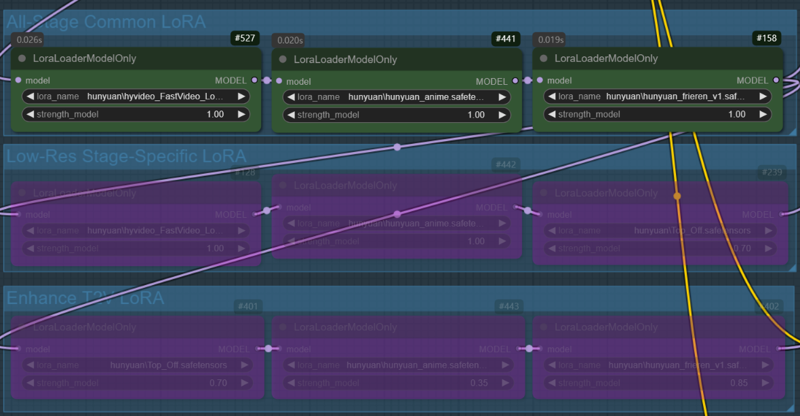
Case 2: All LoRAs used in Case 1 are applied across all nodes

V2V Generation Example:
Same prompt, same seed, and all settings fixed
In the V2V example, the video created in the T2V stage will be used. (case.1)
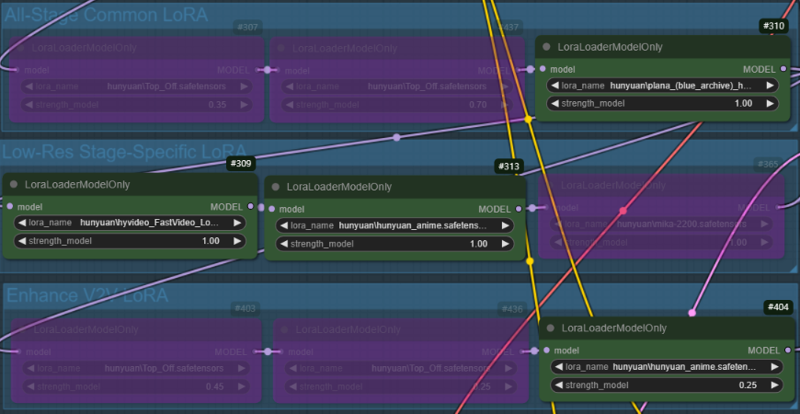
Case 1: A character LoRA is used across all nodes, while Fast LoRA and style LoRA are applied only in the low-res stage. In the enhance V2V stage, the style LoRA used in low-res are applied with reduced weights(1->0.25).

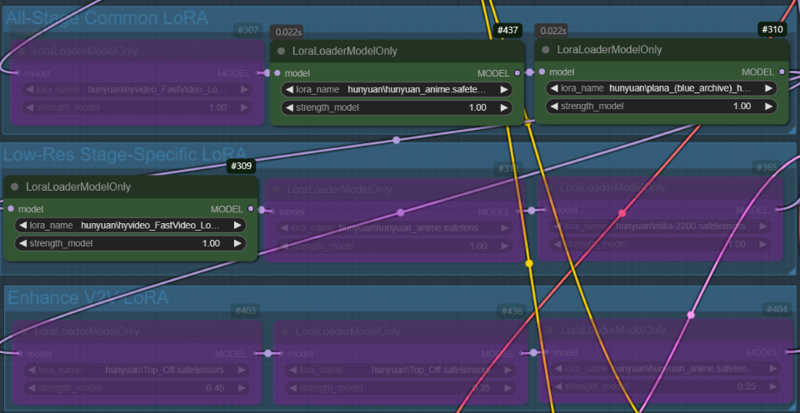
Case 2: Same as Case 1, but the weight of the style LoRA is fixed at 1.0.

Description
A V2V workflow with a modified image processing method. It is based on V1.1. If you want a clearer video, I recommend using this version. I have improved the usability of some nodes. Additionally, I have modified the LoRA Load Node to better support multiple LoRAs. (Please refer to the notes within the workflow.)
FAQ
Comments (18)
disable keep_proportion.
keep Sizes of tensors must match except in dimension 1. Expected size 18 but got size 35 for tensor number 1 in the list.
If there were no issues in a previous version and Triton is installed in your Windows environment, would you like to try updating ComfyUI?
@PEERLESS my ComfyUI triton ver is 3.2.0. I almost update ComfyUI at every day.
Could I get the video file you used? I’d like to check if the issue occurs on my PC as well.
@PEERLESS i used your example vids (right side). no touch any frame setting.
Then, could you please wait a moment? I will upload a workflow that does not use the Tea Cache and Wavespeed nodes.
Upload completed. Please check it. If the nodes work, then tea cache or wavespeed nodes or related components(triton etc) might be the issue.
I'm having trouble with exactly the same error. I'm still getting the same error even after updating ComfyUI and using a workflow that doesn't include the Tea Cache node or Wavespeed node.
When disabling the InstructPixToPixConditioning node, the process works properly, which suggests that this node is causing the issue.
@popz_132 This is a workflow where the sampler node is connected directly without passing through the decode node. This is not the logic I intended, but please test it. If this doesn't work either, the issue is more likely related to your installed ComfyUI or system environment rather than the workflow itself. Core node issues are mostly related to the user's environment. (This node is a core node of ComfyUI.)
json) https://pastebin.com/M5TPDWBF
@PEERLESS I tried the attached workflow but encountered the same error. If this is due to my local environment, I'm at a dead end. Is the InstructPixToPixConditioning node essential for using the input video as a guide? If not, I'll try using it without this node for now.
@popz_132 It is not essential, but it is a necessary node to preserve the elements of the original video. Without it, a higher denoising strength will be required, which may result in a slightly blurry screen.
@ioritree @popz_132 After checking a few things, it seems that there is an issue with the latest version. Please roll back to v0.3.13 by using 'Switch ComfyUI' in the ComfyUI Manager and then restart ComfyUI.
What am I missing here? The downloaded zip contains 2 png files and no workflow json, is it just an example on how to build the workflow manually or am I completely daft?
Drag it the same as the json file :D
@PEERLESS interesting, I tried that before and it said "Unable to find workflow", worked this time lol
@Pity_the_Foo There are cases where EXIF data is lost. Also, if EXIF data is lost during the process of resizing an image or uploading it to a website, the workflow is deleted.
+Adding one more thing, MP4 files uploaded to Civitai sometimes contain workflows. If you find something you like, try saving it and dragging it. Maybe there's a workflow inside. XD
@PEERLESS thanks, I did know that which is why I tried dragging it to the workspace before I asked you about it. Do feel a little dumb since I didn't try again first lol...