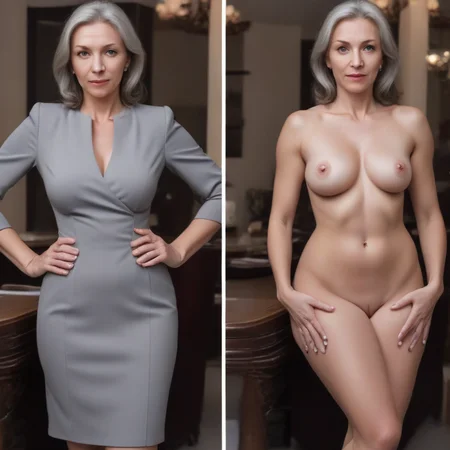
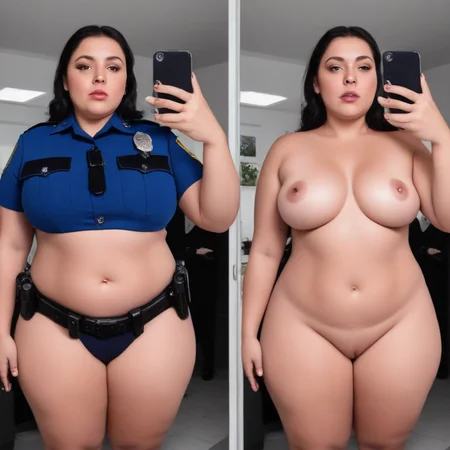
The purpose of this LoRA is to produce side-by-side images of a subject, one wearing clothes and the other nude. It can also be used for creative compositions which contain both clothed and nude figures (clothed on left, naked on right).
Prompting and Troubleshooting Guide
Pony v1
Pony v1 is only for use with the Pony Diffusion model, or with models fine-tuned from Pony. The onoff keyword is trained into the LoRA's text encoder. Include the keyword in your prompt and describe your subject and their clothing. Combining this LoRA with Pony is a good way to get both a clothed character on the left and a nude/undressed character in a sexual situation on the right.
v5.14
I revisited the training data compared to v4, trimming out low quality images and adding some new ones to increase the diversity of styles and body types.
v4 and v4.x
v4 is the first version for SDXL that includes the "onoff" keyword in the text encoder. Simply include the onoff keyword in your prompt and describe your subject and their clothing.
v4.x is a later epoch from the same training run; it can be better at maintaining the same character on both sides of the image, but it's sometimes more creative with the composition so the right side isn't always completely nude.
v3
In the 3.0 release, the text encoder is untrained. That means you'll need to explicitly prompt for the side-by-side image to coax SDXL into initally cooperating.
Helpful prompt inclusions: SDXL requires a little more prompting help than SD1.5, so I recommend preceding your prompt with "side-by-side picture, left side dressed, right side undressed" and then describing your subject and their clothing/environment. You might want to add "clothed and nude" but see the notes below.
Is it generating a single image of the subject? Add prompt inclusions to encourage two images. E.g. side-by-side photo, 2 panel
Is it generating different subjects? Note the aspects that are different and add the desired detail to your prompt. In particular, describing the hairstyle can be important to maintaining a consistent subject between panels.
Is it generating too much or not enough nudity? If both sides are clothed, add a prompt phrase like "dressed and undressed" or "clothed and nude." For particularly stubborn outfits, you made need to describe nude body features as well (e.g. breast size, nipples). If the left side ends up being nude as well, try dropping any "clothed and nude" part of the prompt and reduce the frequency of nude body descriptors.
How do I use this to nudify an existing image?
This question comes up a lot, and the answer is: you don't! This is for generating new images of the same subject both clothed and nude.
If you want to change the clothing that a subject is wearing in an existing image, you're better off using in-painting for that, at which point this LoRA isn't really needed.
What about SD 1.5?
If you're working with SD1.5 or a derivative checkpoint, there is already a LoRA for that.
Description
This version was trained at 640x640 resolution using the Prodigy optimizer
FAQ
Comments (12)
Will there be a version trained on 1024x1024 images size?
Yes! I think I've got the bugs ironed out of the process now. Might take a few weeks to get through the training data at that resolution, though.
honestly, if it's not trained at 1024 x 1024 it's not really for SDXL. The results are not to different from what you can get with the 1.5
That's a fair judgment. Now that I'm more comfortable with the process of pausing and resuming training from a saved state, I'm confident I can (eventually) churn out a working 1024 version of the LoRA on the machinery I have.
Question for everyone. I was thinking of this question of image resolution for Lora 'Concepts'. If the concept is On/Off, does the detail come from the images the Lora was trained with or the Model we are using? Does the Lora merely help with having 2 panels, one covered and one not or...does it impact the actual details?
I would also be interested in knowing the answer to this.
I'm very curious about the quality of results achieved by people using this LoRA at different resolutions.
@Invisidude Using your Lora I was able to create a car with/without a cover. If you trained with 1024, would I have gotten better car details? Same with my bigfoot picture. I think for some concepts, the resolution may not matter (as much)? But if it's a style or a person, I am certain resolution would make a huge difference. Just some things I was thinking about while using your Lora this AM and looking at the comments. Interesting.
@mistermcluvin Love those car and ghost pictures. 😁 I think you're onto something.
Would this also work with img2img (to nudify existing pictures)? And if so, what to put in the prompt?
It could work (with in-paint or in-paint sketch), but I wouldn't trust it to get the face right. While using img2img, the source image starts out blurry (diffused) as far as SD can tell, and then gradually gets more in focus, with SD drawing in the in-painted areas to try to match the prompt and the surrounding image. Since the face on the left won't be in focus until the very last step (at which point it's too late for SD to correct the right face) you'll get mismatched faces.
You could edit the original image to have a copy of the subject standing on the right side, then in-paint just their body so SD doesn't have to worry about the face, but at that point you're already doing so much work to "nudify" the subject that you don't really need this LoRA. Might as well just in-paint the original image and prompt for nudity.
Please stop bucketing less than 1024 with SDXL! Thank you.
New version is up, bucketed at 1024x1024 up to 2048 max!