### You can access the model files in the "Files and versions" tab.
#### Model files may be downloaded with ModelScope SDK or through git clone directly.
### LoRA Description
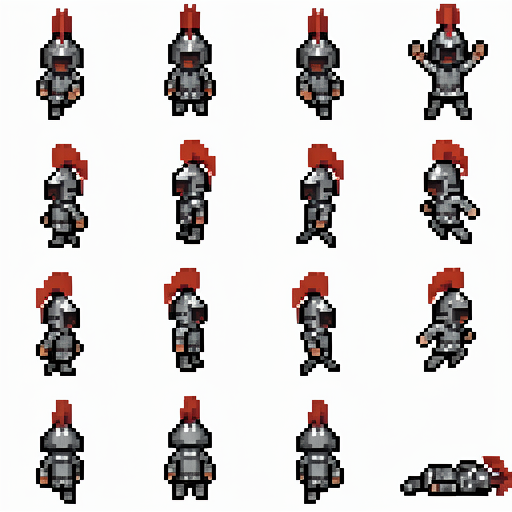
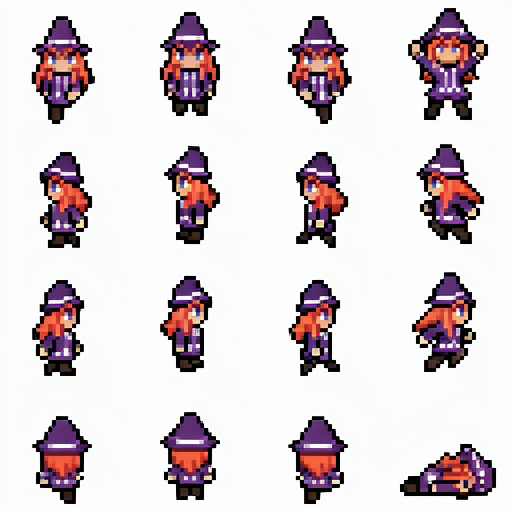
A pixel art spritesheet LoRA for small 32x32 characters, with animation frames for walking up/down/left/right, standing with both arms raised, jumping left/right, and lying on the floor.
Download with ModelScope’s Python SDK
```bash
#Install ModelScope
pip install modelscope
```
```python
#Download with ModelScope’s Python SDK
from modelscope import snapshot_download
model_dir = snapshot_download('svntax/pixel_spritesheet_4walk_small_lora_v1')
```
Download with Git clone
```
git clone https://www.modelscope.ai/svntax/pixel_spritesheet_4walk_small_lora_v1.git
```
### How to use
You can generate spritesheets with text only, or you can use a reference image of a character. Image outputs must be 512x512 because that's the size of the spritesheets used in training.
### How to get pixel-perfect images
Downscale by a factor of 4. So 512x512 output images should downscale to 128x128. Using k-centroid scaling, for example, works well.
Description
For image reference, use this prompt:Create a pixel art spritesheet of the character in the image. The spritesheet is a 4 by 4 grid of four rows of frames - first row is 3 walking frames facing down and 1 frame both arms raised, second row is 3 walking frames facing left and 1 frame jumping left, third row is 3 walking frames facing right and 1 frame jumping right, fourth row is 3 walking frames back view facing up and 1 frame lying on floor.For text-to-image, use this prompt:A pixel art spritesheet of . The spritesheet is a 4 by 4 grid of four rows of frames - first row is 3 walking frames facing down and 1 frame both arms raised, second row is 3 walking frames facing left and 1 frame jumping left, third row is 3 walking frames facing right and 1 frame jumping right, fourth row is 3 walking frames back view facing up and 1 frame lying on floor.